Showing posts with label Custom Roms. Show all posts

Download CyanogenMod12.1 Custom ROM For Gionee M5 Mini (CM12.1)

Using Gionee M5 Mini? You can now download CM12.1 (CyanogenMod12.1) Custom ROM For Gionee M5 Mini with beautiful user interface and new features to give your Gionee device a new look.
CM12.1 custom rom for gionee m5 mini

Last month, i posted the article on Gionee M5 Mini Android 6.0 Marshmallow OTA update and today, i have more good news for you - I will show you how to install, flash, and download CM12.1 CyanogenMod12.1 Custom ROM For Gionee M5 Mini mainly designed for tweakers and geeks.

You can recall that similar CyanogenMod12.1 ROM was available for Tecno Boom J8 sometime ago and it packs almost the same features as that of J8. The custom ROM is smooth, responsive, beautiful and sleek. Below are the main features of the ROM.

FEATURES OF CYANOGENMOD12.1 ROM FOR GIONEE M5 MINI
  • It comes with some nice pre-installed themes
  • You can as well use any fonts from the pre-installed fonts
  • Likewise you can freeze any app you so desire in order to free up space and ram
  • Gapps supported
  • USB OTG works smoothly
  • WiFi Hotspot
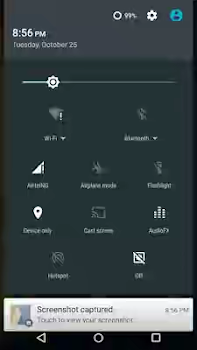
SCREENSHOTS OF GIONEE M5 MINI CYANOGENMOD12.1 CUSTOM ROM
CyanogenMod12.1 Custom ROM For Gionee M5 Mini

CyanogenMod12.1 Custom ROM For Gionee M5 Mini
WHERE TO DOWNLOAD THE ROM (Links)
  1. Download Gionee M5 Mini CM12.1 : CyanogenMod12.1 Custom ROM 
  2. Download Gapp here (NOTE: download and flash this only if Google playstore does not work after installing this rom )
  3. Download Camera fix here (which is the noticeable bug on the ROM)
  4. Download TWRP for Gionee M5 Mini here
NOTE:I advise you to follow the steps on this tutorial very carefully as I won't be held resposible if you brick your phone in the process of flashing this ROM. Make sure you have a backup of your current ROM and data. You should be conversant with flashing of ROMs and use of SP Flash tool to be on a safer side. Having read and agree with the above disclaimer, you can go ahead and flash it.
HOW TO DOWNLOAD & FLASH CYANOGENMOD12.1 CUSTOM ROM ON GIONEE M5 MINI
  1. Ensure you have TWRP installed on your Gionee M5 Mini
  2. Once the above step is met, you may proceed to download CM12.1 ROM for M5 Mini from the link above
  3. After that, move the downloaded files to the root of your SD card (not inside any folder)
  4. Now, Switch off your M5 Mini device and boot it into recovery mode by pressing and holding power button + volume up the same time for 6secs )
  5. Once in recovery mode, scroll to wipe and select
  6. After that, go back to the recovery main menu and click “Install”, now locate the rom you downloaded on your SD card and select it to start installation.
  7. As soon as the installation is completed, go back to the recovery menu and click on reboot
NOTE:
Relax, take a cup of cofee or water and wait for your device to reboot as it might take up to 10 minutes for first reboot.

After that, you will see the new look of your Gionee M5 Mini.
ROM credit goes to Swiss carter

Latest: Download Infinix Hot 4 Pro ( X557 ) Stock ROM Firmware and Flash

Official stock rom for Infinix hot 4 pro ( X557 ) is now available for download including the installation and flashing guides. The Hot 4 Pro is one of the latest Android phones released by Infinix mobility recently and it's obvious that those who want to enjoy the device more would like to install the custom ROM.

MAIN BENEFIT OF HAVING A STOCK/CUSTOM ROM OF YOUR PHONE
There are times you might try to do one thing or the other with your android phone like installing font apps, rooting etc which might brick your device. The best way to restore your phone back to life is by flashing the custom or stock ROM meant for it. Another instance is when you install a ROM with many bugs and you wished to revert back to your previous ROM, all you need is to just update this Stock ROM and you are good to go.

READ ALSO... Checkout Infinix Hot 4 Price In Nigeria, Kenya, India, Ghana

NOTE:
1. You should backup all your data first before proceeding.
2. You should check your device firmware to know which version you are using, to do this go to phone settings > about and you should see the _firmware version_ there, then you can proceed to download the appropriate one

DOWNLOAD LINKS FOR INFINIX HOT 4 PRO STOCK ROM
1. Download Infinix Hot 4 Pro X557-H807A1 ROM Here
2. Download Infinix Hot 4 Pro X557-H807B1 ROM Here

HOW TO FLASH THE ROM
✔ Download the stock ROM for your HOT 4
✔After Downloading Rom Open and Extract full File On one folder.
✔ Download VCOM tools from this link: http://goo.gl/D8mWtG (Thanks @SeemabJanjua )
✔ First disable Driver Signature enforcement on Windows 8,8.1 and 10. Then install the necessary drivers, Nothing will work without Drivers.
✔ After setting up the VCOM tools, you need to launch the flash tool as Administrator. ( Download From Here: http://goo.gl/5eHTr2 )
✔ Then Click on Scatter Loading.
✔ Select Scatter File From Extracted Folder.
✔ Select Firmware Upgrade option.
✔ Turn on Developer mode in your HOT 4 in settings. (Optional).
✔ Power off your phone
✔ Then proceed by clicking on Download Button and immediately connect your powered off device by data cable.

Once your phone is rebooted, you should see the stock rom installed with its glory.

Download MIUI V8 Custom Rom For Infinix X551 Hot Note (MT6592) and Flash It

All the Infinix Hot Note users in the house, here is yet another custom ROM for your device to give your device a new look. Android OS is loved by many people globally mainly because of its unlimited customization and ability to tweak it as you like. So if you have been desiring of changing your present ROM, a guy by name Dennis Murumi has ported a custom ROM based on Android Kitkat version for Infinix Hot Note X551

Note: This ROM is based on Kitkat so youu must be on stock kitkat before you flash it on your device

FEATURES OF MIUI 8 CUSTOM ROM FOR INFINIX HOT NOTE X551

  • Create scrolling screenshots - an amazing way to share information
  • Calculate and convert almost anything with the redesigned Calculator
  • Quick ball - the ultimate one-handed control tool
  • Personalize your notes with beautiful templates
  • Get your photos sorted for you with all-new Gallery
  • Dual Apps - create and sign into dual accounts for any app, including WhatsApp, Facebook and more.
  • Second space - perfect for times when you need a clear separation in your life
  • Video Editing -spice up your videos with filters, text and background music
  • Caller ID - automatically identify incoming numbers or find popular numbers when dialing out (India only)
  • Hindi T9 - find contacts easily with T9 dialer search (India only)
  • Enhanced SMS - SMS accounts of popular businesses now display logos and company names (India only)
Below are some screenshots of the ROM


FULL CHANGELOG FOR MIUI 8 GLOBAL STABLE ROM
  • System
  1. Optimization - Sunlight display improvements (08-05)
  2. Messaging
  3. New - Sound for delivered messages in the Settings (07-16)
  4. Home screen
  5. Optimization - Landscape mode for Task manager (07-08)
  6. Optimization - Task Manager stability (07-13)
  7. Optimization - UI details in Task Manager (07-22)

  • Camera
  1. Optimization - Camera's image quality (08-08)

  • Gallery
  1. New - Automatic adjustments for photos when sharing (07-21)
  2. New - Delete photos from device only when browsing offline albums (07-26)

  • Settings
  1. New - Saved and available Wi-Fi networks appear first in the list (07-05)

  • File Explorer
  1. Fix - Couldn't see files saved from dual apps (06-28)

  • Clock / Calculator
  1. Optimization - Improved order for frequently used settings (07-01)
  2. Fix - Quick ball disappeared in some cases (08-05
IMPORTANT NOTICEBefore you flash this ROM...
Make sure you Infinix X551 is rooted
Make sure you have Custom recovery installed on your device, e.g Philz touch
Back up your stock rom, before you proceed.
WHERE TO DOWNLOAD THE ROM
Download Miui V8 Custom Rom For Infinix Hot Note here

HOW CAN I FLASH THE ROM?
  1. Place the downloaded rom in the root of your external SD card (not inside a folder)
  2. Boot to CWM Recovery Mode (Power Off your Phone and then Press Power Button + Volume Up Button until the Recovery)
  3. Go to WIPE menu and select CLEAN TO INSTALL A NEW ROM, confirm when prompted
  4. After the wiping is done, navigate to install menu and choose install zip from sdcard1
  5. Navigate to the ROM zip and select it to flash... Wait for the flashing procedure to finish
  6. Once flashing is done, REBOOT your device
Yea you have just successfully flashed MIUI V8 Stable custom rom on your infinix hot note. After rebooting, you should feel the new interface. Injoy. Credit goes to source

Download Samsung Galaxy S7 Custom Rom For Infinix Hot Note & Hot Note Pro

One of the amazing things about android platform is the flexibility and mesmerizing options of things to achieve while tinkering and tweaking the device especially when it's fully rooted. I could remember back then when i begun my android tweaking journey with practicing on how to flash customs on any available android device then. In fact i installed a lot of custom ROMs on Tecno P5, P9, M3, M5, Infinix Smartphones then, Gionee devices and lots more. Flashing of ROMs is fun and educating also.

In this article, I will introduce the latest "Samsung Galaxy S7 Custom ROM for Infinix Hot Note X551 and Hot Note Pro " devices because the ROM is yet another beautiful custom ROM that would make your Hot Note devices more elegant and sleek.

This Samsung Galaxy S7 Custom ROM packs some neat, clean Galaxy S7 icons, settings, app drawer and lots more. If you are conversant with ROMs, you would notice that the interface of this ROM looks like that of MIUI custom ROM for this same smartphones although this Galaxy S7 brings more beauty to it

YOU MIGHT LIKE:
All Custom ROMs For Infinix Hot Note X551 & Infinix Hot Note Pro Plus Download Links


Screenshots of Samsung galaxy S7 custom ROM for infinix hot note and hotel note pro X551


Features of Samsung Galaxy S7 Custom ROM for Infinix Hot Note X551 and Hot Note Pro
=> Good RAM management
=> Video call
=> Beautiful UI
=> Sleek Samsung boot logo
=> Double tap to wake gesture
=> XIUI Feel
And lots more

Meanwhile, like every other Custom ROMs, there bound to be bugs and fortunately, it wasn't much on this Samsung Galaxy S7 Custom ROM For Infinix Hot Note and Hot Note Pro as we only noticed the inability of selecting ring tone from sound settings (which is not working) and air browse plus few other sensors not working as well. Apart from that, the ROM is clean and beautiful.

ABOUT THE ROM
ROM VERSION: 5.1 Lollipop
ROM KERNEL: 3.10.72+
ROM PORTER: RAJ
ROM DEVICE: INFINIX X551 AND PRO [16+1 And 16/32+2]

Important
This ROM is based on kernel 3.10.72+ therefore it is recommended to only flash the ROM if you are on XUI . And if your ROM is on KitKat please don't flash this ROM as it might brick your phone so only flash if you are using lollipop OS based on XUI.


WARNING
I advise you to make a Backup of your phone before carrying out this ROM flashing. Also make sure you know what you are doing and you are familiar with SP flash tools

Enable assistant menu from Settings>>>Accessibility to access menu options

HOW TO FLASH GALAXY S7 CUSTOM ROM FOR INFINIX HOT NOTE AND HOT NOTE PRO

Download philz touch recover for Infinix hot note X551 & hot note pro here

For hot note pro users 2+16/32gb variant

Download Samsung galaxy s7 BOOT PATCH for your phone here

Replace ROM boot.img with s7 boot patch img for hot note pro

Download Samsung s7 custom ROM for both infinix hot note and hot note pro here

After that, unzip and flash. (See How To Flash ROMs Here

If you are confused or not sure on how to flash ROMs, ask me questions via the comments box or go through this guide i have carefully written down to make it easier. The guide also have screenshots to enable you catch the tutorial easily.

Custom ROMs For Infinix Hot Note And Hot Note Pro


Infinix Peeps am going to List all the available custome roms for infinix hot note and hot note pro here for you to choose from

Requirements Before You Download/install Any Rom
==>Back up your IMEI with mobile uncle
==>Make sure your device is fully rooted & CWM installed
==>Back up your stock ROM in order to avoid story that touch
==>Some of these ROM has some bug yet to be fix, so