
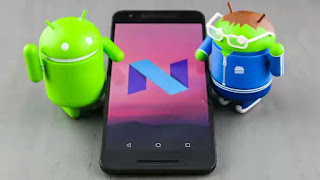
Android N ("N" for Nutella) is the next android OS version expected to be launched later this year but the Beta version has already been rolled out on some Nexus devices so those that are using recent Nexus android phones from google should be aware of what am saying.
The new android operating system will take over from the current reigning android 6.0 Marshmallow OS and the android N (7.0) comes with some new exciting features which are not in the Lollipop and Marshmallow versions.
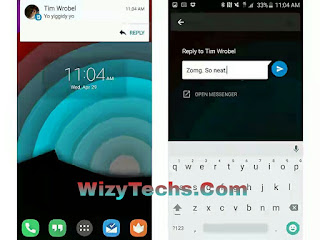
One of the new features features is the "quick reply" feature. This is a very important tool that lets you quickly reply to any message or chat without opening the containing application.
How Quick Reply Feature Works
This is integrated in the android Nutella (android N) and it works like this... Whenever, you are doing something else on another application on your phone, for example when you are browsing on your opera mini and you receive a chat notification from whatsapp, BBM or any other instant messaging app, this feature will bring out a quick reply bar and you will reply the message while still on opera mini. That's without opening the messaging app. It's simple as that.
Although whatsapp and some other messaging apps have a setting where you can enable popup reply that is similar to this function but not all apps have that feature that is where this quick reply comes into play.
The messaging applications that are supported includes WhatsApp, Telegram, Threema, Skype , Line, WeChat, Kik, EvolveSms, YAATA, Textra, ChompSms, Hangouts and Handcent SMS.
How Can I Add Quick Reply Features On My Android Lollipop and Marshmallow Devices?
1. To achieve this, we are going to use a third party application. download Quick Reply apk android app from Google Playstore.
2. After downloading it, run the app, accept terms and simply tap “Please Activate Quick Reply”.
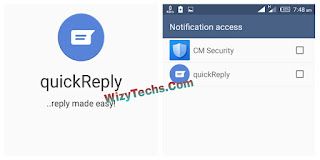
3. Now allow quick reply on the notification access
4. From the app settings, you can customize it to fit your style.
5. That's all. The feature is now in your phone and it enables you reply messages without getting to launch the app. reply from notification, just as seen in the image Screenshots.
READ ALSO 📖
✔ Top 8 Features In Android N That Might Interest You
The new android operating system will take over from the current reigning android 6.0 Marshmallow OS and the android N (7.0) comes with some new exciting features which are not in the Lollipop and Marshmallow versions.

One of the new features features is the "quick reply" feature. This is a very important tool that lets you quickly reply to any message or chat without opening the containing application.
How Quick Reply Feature Works
This is integrated in the android Nutella (android N) and it works like this... Whenever, you are doing something else on another application on your phone, for example when you are browsing on your opera mini and you receive a chat notification from whatsapp, BBM or any other instant messaging app, this feature will bring out a quick reply bar and you will reply the message while still on opera mini. That's without opening the messaging app. It's simple as that.
Although whatsapp and some other messaging apps have a setting where you can enable popup reply that is similar to this function but not all apps have that feature that is where this quick reply comes into play.

The messaging applications that are supported includes WhatsApp, Telegram, Threema, Skype , Line, WeChat, Kik, EvolveSms, YAATA, Textra, ChompSms, Hangouts and Handcent SMS.
How Can I Add Quick Reply Features On My Android Lollipop and Marshmallow Devices?
1. To achieve this, we are going to use a third party application. download Quick Reply apk android app from Google Playstore.
2. After downloading it, run the app, accept terms and simply tap “Please Activate Quick Reply”.

3. Now allow quick reply on the notification access
4. From the app settings, you can customize it to fit your style.
5. That's all. The feature is now in your phone and it enables you reply messages without getting to launch the app. reply from notification, just as seen in the image Screenshots.
READ ALSO 📖
✔ Top 8 Features In Android N That Might Interest You


