Showing posts with label Instagram. Show all posts

5 Tips For Marketing Your Startup On Instagram

Social media marketing has been on a rise since the past few years and now in the year 2017 things have become very different and you cannot have a successful business without a successful social media marketing campaign. There are many social networking sites out there which have made their way up and now are popular among many big business and marketing brands and Instagram is one of them. Check out a great app GetInsta. It helps you to get free instagram followers.
instagram marketing

Starting as pictures sharing website, Instagram has worked its way ahead of everyone and is now among the top attractions for any brand for social media marketing. Today more than 50% of brands are using Instagram for marketing purposes. And where it has been this popular, it could be very tricky to start a social media marketing campaign on Instagram. If you want to make a successful Instagram account that will bring you more customers you will have to work that out. And when you are starting up on Instagram you will need to do follow some tips in order to make your startup successful. Here below are few important tips for marketing your startup on Instagram.

1. Choose your hashtag carefully
Instagram has been a top site for social media marketers since last year and the way it works is pretty different from how other social media websites work. Though, the hashtags are also essential on Instagram as well. When you are marketing on Instagram and you are making a post for your account make sure that you use hashtags that appeal your audience and are relevant. Also, make sure that the hashtag you pick is among the top trends because that is the only way to reach the maximum audience through hashtags. To make a catchy and effective hashtag you can use various tools that are specially designed for Instagram hashtags. So, remember it is very important to use a relevant hashtag for your Insta posts.

2. Gain more followers

Well, this tip is not any rocket science, if you need your startup to be successful you need to get the maximum amount of audience to follow you. In order to be successful on not just Instagram but on any social media networking site, you need to gain more followers. To gain more followers you will need to do some hard work. There are various ways to do that, you can promote your account on different sites, you can pay other Instagrammers to share your posts or you can use your accounts on other social media sites like Facebook to gain more followers. You can also buy followers from Vibbi, which is a platform that is designed for the Instagram marketers to gain more followers, and you can also get more likes and comments by using Vibbi. So gain more followers to achieve success in your marketing campaign.

3. Hold Instagram contests
One of the best ways to get you Instagram get going is to hold Instagram contests. Instagram contests are fun and they are very effective in engaging your audience. You can gain more followers as well by holding Instagram contests because people do really love free things and you might be giving away something free but it will be worth it in the end. You can hold various Instagram contests, you can ask your audience to comment on your posts or you can ask them to share a post with a mention in order to enter the contest. Later you can pick your winner by either seeing who got more likes or you can set a jury to pick a winner.

4. Utilize Instagram Business Tools

As we mentioned earlier that Instagram is among the world’s top social media marketing sites today that there are many tools which are specially made for Instagram marketing. In order to run a successful Instagram marketing account, you need to know the insights of your accounts and all the other things like your audience, their demographics, which of your posts are doing fine and how can you make your account better. You can analyze these things by using Instagram Business Tools.

5. Do not overwhelm your audience
One of very important thing that should be kept in mind while marketing your startup is that you should not overwhelm your audience. Many of us start posting more than we should post when we make a new account on any social media website. When you start posting too much it really annoys your audience, because your audience doesn’t want to see the same thing again and again and in a result, they will unfollow you. Share less and share content that is of the highest quality. So, make sure that you share a significant amount of posts to keep your audience happy.

GUEST POST
By: Qurban Shah

5 Ways To Get Real Unlimited Instagram Followers

Do you want to get huge and real number of Instagram Followers and Likes within few minutes? Are you tired of languishing with very little followers on Instagram? Do you want many people to follow you and engage with your posts? I have some cool working tips for you today. Just follow me along. Or if you want an easy way, you can check GeInsta to get free instagram followers.

Am not talking about dubious ways or unreal massive Instagram Followers in the form of robots, no! Am talking about tricks to get real human followers. We all know that social media platforms like Instagram are great place to market yourself, your services and promote your goods as well and without huge number of followers, that purpose might not be achieved. The more your audience, the more probability of getting offers and doing business online.

Instagram which is also owned by Mark Zuckerberg, the owner of Facebook and WhatsApp is one of the worlds most popular platform for sharing photos as well as marketing products. Almost all celebrities, top businesses and virtually every category of people are on Instagram and more are joining every second so you don't have to miss the opportunity of also utilizing the app for your own benefits.

So without wasting more time, shall we proceed to the main topic of the day which is ways to get unlimited massive followers on Instagram? Oh I guess you are ready so let's go there.
Other ways of getting real Instagram followers apart from using voymedia are discussed below.

HOW TO GET MANY FOLLOWERS ON INSTAGRAM


1. MAKE USE OF INSTAGRAM STORIES
Instagram Stories was introduced last year - imitating snapchat stories but it has proved very successful so far as users now see it as fun, versatile, and a great way to connect with your audience. Not just that but you also got a chance to be recommended by instagram.

How It Boosts Your Followers
If you check the 'Explore page' on Instagram, you will notice a row of Instagram Stories at the top of the page. The reason those Stories appear is because Instagram selected them based on the accounts you follow and the posts you like. Instagram may also show you Stories that accounts you follow have liked, or were liked by a large number of people. From there, someone can see your profile and follow you. It exposes you to a wide range of audience.

Okay you may be asking, how do you get on the Instagram Explore page? It's not a difficult task but you need to create a highly-engaging, super-targeted content. “The better your Stories are, and the more they speak to a specific audience, the higher the chance that Instagram will add your account to the recommended Stories at the top of the Explore tab,”

2. UPLOAD & SHARE ENGAGING VIDEOS
An average person likes Videos and pictures because images speaks louder than words and passes a lot of information across to the audience. Therefore, Video content is a powerful tool for brands and individuals looking to build trust with their followers and reach new audience. Uploading relevant video gives you higher engagement which means the more likes and comments your post receives, the more people will see your post on Instagram and eventually follow you. In other words, if you’re able to generate a lot of engagement on your Instagram posts shortly after posting, this signals to Instagram that your post is quality, engaging content and your post will move to the top of your followers feeds and be shown to more users. The more people see your posts, the more chances of getting real human followers.

3. SEARCH THE HASH TAG #Likeforfollow.
Another trick of getting more followers is using the hashtag #likeforfollow trick. Just go through pics and start to like pics that you feel are in some are related to your field or brand. Although you shouldn't expect all to follow you back immediately for a like, but the return rate is around 12%, not too bad. Many people have utilized this trick to get thousands Instagram followers.

4. SEARCH THE HASHTAG #Shoutout
#shoutout is yet another powerful Instagram hashtag tool used to get more followers. All you need to do is apply the same procedure in number 3 but use #shoutout at the hashtag. People will give you a shout out on their page and people will start following you right away.

5. COMMENT ON PEOPLE'S PHOTOS
If you are the ghost type that always come to see people's updates and go away without commenting, it's time to come out of ghost mode completely and start dropping comments on Instagram posts if you really want to get more followers. This is because, the 'follow back' percentage is a lot higher if you always drop valuable comments. People get likes all the time, they don't always check who's liked their pics. Comments are a little rarer, so the user is more likely to check out who commented on their pic. Just little comments like 'great pic', 'nice shot', 'I've been there!' etc. That's how far comments can help boost your Instagram Followership.

SEE ALSO... Instagram Introduces Multiple Picture Uploads

Am sure you find this Instagram tips helpful. Once again, this article is based on the legal and real ways of getting more Instagram followers without doing any fishy thing. It's pure and genuine. Kindly hit the SHARE buttons below if you found this helpful and drop your comments if you know of any other genuine way of getting massive followers on Instagram

Instagram Now Allows Users Mute Account

Instagram has just added a new feature to its platform called "Mute" which allows users to mute accounts, or in other words hide their posts without unfollowing them.
Instagram mute

To see this new feature, simply login to your Instagram account and go to Options (...) menu. in the corner of a post. You'll see options to mute posts, or mute both posts and stories from that particular account.
Instagram features

An alternative method to mute posts and stories is by pressing and holding on a story in your tray, or from a profile.

READ: Download GBInstagram Apk

The Mute feature will be rolling out to users over the coming weeks. Keep tab.

Download GBInstagram V1.30 With Video and Picture Saving Features

GBInstagram is a customized version of the official Instagram and it has more features like ability to save pictures, videos and stories shared on Instagram among other features without the need for third party apps.

We all know that you cannot download stories, images and videos shared on the regular Instagram except by using a third-party app but with this Mod version you can do all that within the app.
Download GBInstagram
Just like GBWhatsapp and GBtelegram, GBInstagram comes with even more features and you can enjoy all of them when you download the app for free.

The GB Instagram version 1.30 APK includes all newly added features on the official app as well as other customizable features you may not find elsewhere.

In other words, this Instagram Mod gives you more freedom to access exclusive features which makes Instagram more interesting. In this post, you will discover all these features and decide whether to download or not.

ADVANTAGES OF GBINSTAGRAM APK

✔️ With gbinsta, you can download Images, Stories and Videos From Instagram without a third party app
✔️ You can Upload Images and Videos From Alsturi.
✔️ It allows you to Translate Comments into your desired Language.
✔️ It allows Users to Copy Comments.
✔️ You can Copy and Share Images Links and Videos Directly.
✔️ Users can customize Theme Conversations screen and conversion.
✔️ You can Zoom In/Out for photos.
✔️ You can play play Audio with Video Automatically.
✔️ It Allow Users to Copy Description.
✔️ There is Notification Count.
✔️ Your phone must not be rooted for you to Download it.
✔️ It Allows you to Use Two Instagram in the Same Phone just as the case of Whatsapp and GBWhatsapp
And Much More.

OTHER FEATURES OF GBINSTAGRAM APP

THEMES: GBInstagram allows you to change the theme of your Instagram App seamlessly.
Gbinstagram themes
CUSTOMIZATION: You have the option to customize the app header and chats the way you like by going to Settings>GB Settings and that’s all.
Gbinsta customization
COPY COMMENTS: You can now coppy comments posted by your friends on Instagram or even your own comments easily.

Two Instagram app in one phone
TWO INSTAGRAM IN ONE PHONE: You can use this GBInstagram app with your normal Instagram app because the package name is different. This means you now have two different Instagram apps in one device.

COPY BIO AND DESCRIPTION: You can copy your friend’s post or introduction texts in the biography section of their profiles.

COPY AND SHARE URLS: GBInstagram helps you share images and videos URLs to your friends on the app or on other social networking sites.

TRANSLATE COMMENTS: You can read other languages comments with the help of the automatic translation.

ZOOM PROFILE PICTURES: You can zoom any profile picture by tapping and holding the image.

SEE ALSO: How To Get Real Instagram Followers.

NO BAN ISSUES: The app is safe and free to use. You won’t face ban when you use this mod application.

ROOT IS NOT REQUIRED: whether your device is rooted or not, this app works flawlessly with no restrictions.

PREVIEW FOR IMAGES AND VIDEOS: You can play videos with external video player as like the GBwhatsapp feature.

UPDATES: the app is regularly updated as new uodates are added to the official app.

DOWNLOAD LINK FOR GBINSTAGRAM APP
Click here to download GBInstagram 1.30 apk and enjoy all the goodies.

Instagram Video Calling Features To Be Released Soon

All the Instagram fans should get ready for the latest update which comes with video calling features that will allow you make video calls with your followers within the app.

Recall that Instagram is owned by Facebook CEO, Mark Zuckerberg who also owns WhatsApp. And both Facebook Messenger and WhatsApp already has video calling function so it's not really a big surprise to see it in Instagram as I was anticipating it.

HOW IT WORKS

It works similar to WhatsApp video calling. When it's rolled out, you will see new icon that appears in the navigation bar in the chat, just like WhatsApp. You can see the screenshot below courtesy of Wabetainfo.

Once you open an active chat with another follower on the platform, the video calling icon will be visible for you to tap on if you wish to. Meanwhile you will be able to video call only if the other user has already accepted the request to chat, otherwise the icon won’t appear.

However, while Video calls are a welcomed development in some countries with very good internet speed, it could be a torn in the flesh for people residing in areas with poor network coverage because the experience is too bad.

This is one of the reasons why some people ignore whatsapp calls. Network is a big deciding factor here.

SEE ALSO: 5 Ways to Get Real Instagram Followers.

For now, this feature is still in development mode but expected to be officially rolled out in coming days. When it's available, both Android and iOS users are expected to enjoy it.

How to Disable or Turn Off "Last Seen" Feature on Instagram

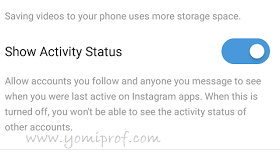
Instagram added a new feature last week called Activity Status. This allows your Instagram followers to know some of your activities such as your "last seen" and your online status.

However, I noticed some users are not conformable with this feature. Some people don't want to be monitored for one reason or the other so it's because of these category of users that this post was written.

I am actually saying that there is a way to turn off the "last seen" feature on Instagram so that no one will know when you are online or offline.

By default, this feature is always activated meaning without your consent. It also means all of your connections on Instagram can tack your the last time you opened the app.

As we all know, both WhatsApp and Facebook has this feature. Remember, those platforms are owned by Mark Zuckerberg who also happens to be the owner of Instagram.

IMPORTANT
If you turn off the Activity Status feature on your Instagram, your followers won’t be able to see your instagram activity and you too won’t be able to track theirs but you can always see their posts, videos and vice versa. Follow below steps if you want to disable yours.

HOW TO TURN OF INSTAGRAM ACTIVITY STATUS (Last Seen)
✔ Login to your Instagram account
✔️ Tap on your Profile Tab
✔️ Then tap the gear icon next to EDIT Profile
✔️ Now scroll down to Settings and toggle the switch next to Show Activity Status.

Once you have done this, the activity feature will be disabled.

You Can Now Use Face Filters in Instagram Live Videos

Instagram has added new "Face Filters" features to its platform meaning you can now add face filters in a live video on Instagram. In other words, you can use one of the many face filters that were recently introduced while streaming live to their followers.

Interestingly, you are not limited to only choosing a filter for a stream but you can also switch between them while you are still streaming the live videos.

Also added to Instagram is the sunglasses filter, which will be available exclusively for live videos for the next week. Users can tap on the filter to change the scenery that is reflected off the glasses.

As always, once the live broadcast ends, you can decide to save your live stream as a story for your followers to see for the next 24 hours or discard it.

You Can Now Post Pictures in Landscape Mode on Instagram

Latest Instagram update to its mobile app now allow you post pictures in landscape mode. You can now select either a "portrait mode" or a "landscape mode" when trying to upload multiple photos and videos in a single post.

The purpose of this new feature is to improve how you share photos and videos on the platform which is one of the top photo sharing social media platforms in the world. Before now, Instagram only allowed an aspect ratio of 1:1 for photos and videos. However, with this restriction removed, you can now share photos and videos in either portrait mode or landscape mode, depending on the suitable orientation of the photo or video.

Recall, earlier this year Instagram introduced a feature that lets users upload as many as ten pictures in a single post. But the bad part of it was, Instagram users were forced to crop their photos to fit that 1:1 aspect ratio, which may not have been palatable to some users who might have taken pictures of a larger size. Now, users no longer have to crop out parts of their photos before they post them on Instagram.

SEE ALSO... How To Get Real Instagram Followers

This move will surely increase the user experience in the app and make it more appealing to Instagram users. Right now, Instagram has more than 700 million users. Some of the recent improvements to the app were rolled out in June, which included the ability to re-share live videos to Instagram Stories. This helped users to retain live videos even after they had ended. Also, there was an Archive feature, which allowed users to remove certain posts from public view, while keeping it on Instagram for later viewing.

How To Gain Over 2000 Instagram Followers Via Account Linking

Instagram is one of the world's top social media platforms for sharing photos and video clips with friends, family and colleagues. It was later acquired by Facebook owner Mark Zuckerberg who also acquired WhatsApp and went on to integrate Facebook and Instagram. Well, one of the challenges people who use Instagram face is the difficulty of getting followers (friends) but am here to reveal a simple method which isn't a cheat, not illegal and not bad manipulation.

So if you want to get over 2000 followers on Instagram, the secret is to link more social media accounts that you are already using. It is really easy to do, and it is one of the easiest ways to gain more followers on Instagram. Note you can get more than that, and you can also get less. It all depends on how many followers you have on your other social media accounts like Facebook.

When you link other accounts, it notifies your friends, family and other people on your lists for them to add you up. Below is a guide on how to do it.

HOW TO LINK YOUR FACEBOOK AND OTHER ACCOUNTS

✔ If you are using an iPhone, go to your Instagram profile and tap on the options icon under the follower count.

✔ But if you are using Android device, tap on the three dots at the top right corner of your profile page.

✔ Scroll down until you see Linked Accounts below Settings and tap on it.

✔ That is where you will be presented with options for the accounts to log in to. If you tap on Facebook, for instance, it will prompt you to log in through the Facebook app.

✔ Now enter your Facebook login details and authorize Instagram. You can do the same with Twitter and any other social media platforms you have accounts for.

HOW TO CONNECT YOUR CONTACTS

To stand a chance of getting even more followers, you need to connect your contacts as well.

✔ Under Linked Accounts, you will see the option labeled Contacts. Tap on it, then turn on Connect.

HOW TO FOLLOW PEOPLE

When you have successfully linked all your social media platforms to your Instagram account, you can start following as many people as possible.

✔ Go back to Options on Instagram, then scroll down to the option titled Follow People.

✔ Then tap on Facebook Friends below it, then tap on Follow All.

However, sometimes you might not be able to actually follow everyone you are connected with at once. In this case, simply repeat the above instructions until your followers add up.

Repeat this trick every time you post something new on Instagram. Not only will you increase your follower count, but you will also get more likes on your recent posts.

SEE ALSO...
✔ Follow WizyTechs on Instagram
✔️ Follow WizyTechs on Twitter
✔️ Follow WizyTechs on Facebook

I hope this trick helps you get more followers on Instagram. Kindly hit the SHARE buttons below to let your friends on social media know about this. It's simple but productive.

Instagram To Introduce Multiple Photo Posts

If you've ever wanted to feature more than one pix on Instagram in the identical put up, like an album of sorts, properly, then you will be very satisfied to read about the social community's next feature. Instagram is on the brink of allowing multi-picture posts.

The function is presently been tested in Instagram's beta app for Android, though some people are seeing it already in the non-beta app.

It's uncertain how long it will take for this to roll out to each and every Instagram user out there, however after you get it you will be capable of long faucet on a picture in your gallery to enter a multi-select mode to be able to allow you to choose other pix, up to 10 in total, to enter that one submit. After this, you may add your selected filters to every image one after the other, after which submit the whole choice as an album to your timeline. Those who comply with you may see one image inside the publish, but can get to the others by means of swiping horizontally.

If you aren't using the beta app, you'll be capable of choosing a couple of pics and edit them, however seeking to submit the ensuing album will continually fail with an error. With a bit of luck the testing goes nicely and would not take lengthy, and the multi-picture posting capability will be available to every person using Instagram soon.

Get Ready For Instagram Adverts on Stories - James Quarles

Instagram is set to start delivering carousel ads on Instagram stories following the announcement that it will begin displaying adverts within stories, pictures and short videos that last 24 hours before dissapearing in the abyss (or Instagram’s servers). These ads can be seen at the top of the feed and apparently you will also reach adverts by third parties now.

Meanwhile, full-screen ads will appear between different users’ stories but will be skippable. According to Instagram, 150M people are making use of this feature per day, the same as Snapchat’s daily users.

However, the video ads will be marked 'Sponsored' to let users differentiate ads and the main videos.

Below is the official statement from James Quarles, the VP of Instagram Business
Adverts are designed for “reach” rather than immediately to drive sales and will not have links to websites.


Remember Facebook also want to start monetizing videos just like YouTube.

5 Things That Happens When You Abandon Facebook, WhatsApp, Twitter, Instagram

Social media platforms like Facebook, WhatsApp, Twitter, Instagram, SnapChat and others has come to stay since they are filled with fun, informative and could connect you with friends both within and from any part of the world. However, what we don’t realise is that social media is very addictive. You'll be ignorant of this except you're taking a smash or stop social media to peer the change.

In the mean time, listed here are some of the crucial interesting things that happens when you finally decide to pull the plug on social media.

1. YOU'LL GET EXTRA WORK PERFORMED
when you don’t have to worry about your smartphone buzzing left and right, you are going to be very productive. That is for the reason that nothing is distracting you. For this reason some workplaces block access to social media during work hours. After we discontinue ourselves from checking social media, over and over, it relatively becomes an additional type of unnecessary multitasking.

2. YOU'RE GOING TO GET EXTRA SLEEP
Due to the fact that our phones are at all times beside us, you might be continually tempted to check social media even though you're going to deny yourself sleep which you really want. So, it's most likely authentic that for those who quit or depart briefly, you'll undoubtedly get more sleep.

3. FACE-TO-FACE RELATIONSHIPS SHALL BE STRENGTHENED
Sure, social media can be an exceptional technique to keep in touch with old buddies or family members. However considering of this effortless approach to join, many people have stopped travelling to see friends and loved ones. Reducing your social media interactions and visiting your family and friends will give a boost to relationships.

4. YOU'LL BE LESS STRESSED
Always chatting and viewing people's pictures on social media increases stress if you don't limit the time you give to it. You are going to be calmer and centered in the event you make a decision to quit social media for a given period of time.

5. YOU KNOW YOUR REAL PALS
Your digital followers and neighbors on twitter, Instagram as well as Facebook are just numbers. Your relationship with them mostly probably will end on social media. Leaving social media will aid you separate your pals from the gang.

Final Words
Although the above points are true but the advantages of social media to this our modern world cannot be overemphasized. Personally, i can't stay without social media for a day as i benefit more from it in divers ways.
What about you?

You Can Now Bookmark and Save Posts on Instagram and View Later

Instagram has added "bookmarks" and "saved posts" to the app's latest version both for iOS and Android platforms. These new features are part of the profile sections of the app which before now; wasn't available.

HOW IT WORKS
To place something in Saved Posts, you simply tap on the new bookmark icon that will show up underneath every single photo in your feed. The things you bookmark this way will be available to view later in Saved Posts. The Saved Posts tab in your Profile section is private, which means only you can see what you've kept around for later viewing.

HOW TO ENJOY THE NEW FEATURES
Once you update your Instagram app with the latest version 10.2 either via iTunes App Store for iOS and the Google Play Store for Android, you are good to go.

How To Easily Disable Or Delete An Instagram Account

Do you have an Instagram account you want to delete or disable for one reason or the other? We are aware that Instagram is fun and it's one of the best platforms where people worldwide share their lovely photos as well as videos for others to see. But in case you have more than one account or you simply want to get rid of an account, I gat your back. Just follow the guidelines here to achieve that

HOW TO TEMPORARILY DISABLE INSTAGRAM ACCOUNT
Note that when your account is temporarily disabled, all your photos, likes, comments will remain hidden because non will be wipes or deleted permanently until you decide to reactivate your account. Having said that, below steps is how to disable Instagram account.

✔ Go to the Instagram website (Instagram.com) and log in using your username and password.

✔ Once you’re in, click on the ‘profile‘ icon at the top right hand corner.

✔ Click on the ‘Edit Profile‘ button next to your username.

✔ At the bottom right you should see an option called ‘Temporarily disable my account.’

✔ Simply follow the on-screen prompts and you’ll be done in no time.

If you want to reactivate your account, simply sign in using your username and password. It’s that simple.

HOW TO DELETE INSTAGRAM ACCOUNT
However, if you want to delete your account, remember this can't be undone as all your comments, likes, photos and whatever will be deleted. So if your intention is to go offline from Instagram for a while, i advise you to use the first option (disabling). Otherwise, follow below steps.

✔ With your web browser, goto to this Instagram account removal request page

✔ Sign in using your Instagram account.

✔ From the list of available options select why you want to delete your account.

✔ Once you’ve made your choice, click on the ‘Permanently delete my account‘ option.

Still confused 😕? Ask your question via the comments box below and i will try my best to put you through.

Finally, Official Instagram App For Windows 10 Is Available For Download

At last Windows 10 users can now have a breath of fresh air as Instagram app for Windows 10 is now available for download on Windows store.

Well, it's not as if we haven't been using Instagram on PC before now but the method we used was via third-party apps and web-based Instagram platform but now, the official app is ready for everyone on PC.

With the new app, you can easily upload pictures directly to Instagram from your PC camera roll folder, as well as been able to get notifications, chat via Instagram Direct, and of course use Stories, Search, Explore, Profile, and Feed.

Meanwhile, the main bug in the app is that it crashes whenever you try to add a Story, especially if you’re using a PC without a backward-facing cam.

We hope subsequent updates will fix that bug.

WHERE CAN I DOWNLOAD IT?
Download Instagram For Windows 10 Here

Feel free to share with your friends on social media.

You Can Now Pinch and Zoom Photos On Instagram, See How To Do It

Basically, Instagram doesn't allow users to zoom pictures on the app and this has long been a defect on the app but am glad to let you know that this is now a story of the past as Instagram have decided to listen to its users review and yearning online and bring the zoom feature.

The much needed Zooming feature allows you to zoom either images or videos posted on Instagram

You would agree with me that there are lots of top-notch images uploaded on Instagram on daily basis but the platform seems to still fall behind due to the unavailability of zoom-in feature, as such. Ordinarily, users try “double-tapping” a photo and end up with a “heart” — a disappointed heart, indeed.

However, don't get too excited yet as this feature is only available on iOS devices at the moment but we are hopeful it will roll out on Android devices soon.

Let me quickly show you how to activate this interesting feature on your iPhone and iPad devices.

HOW TO ZOOM PHOTOS ON INSTAGRAM

1. Update your Instagram app to the latest version. You can download from Apple iTunes store

2. Launch your updated Instagram app

3. Open the app settings

4. Then, move to General followed by Accessibility.

5. Here you will see an option named "Zoom",

6. Finally, simply flip it On.

Hurrah!!! 😁 you are done. You are ready to zoom any picture on Instagram

As usual, to zoom any photo, just double-tap your three fingers to apply the zooming to your choice.

You can drag your three fingers to zoom as you like. Meanwhile, if you want to exit, simply double-tap with your three fingers one more time, and you’ll go back to the normal zoom.

Android users... Yours is coming soon. Keep tuned!

Instagram Adds Swipe To Zoom, Double-tap Camera Switch - Imitates SnapChat Further

Instagram continues its recent imitation of SnapChat video futures by pushing new updates which now allows to zoom by swiping the finger up and down while recording a video.

Another newly added feature is the ability "double tap" on the viewfinder to switch between front and back camera. This happens while recording video. So you can easily switch between the front camera feed and the back camera.

Apart from the above features which are now on Instagram, there were some bug fixing and performance improvements to make stories load faster on the app.

How Can I Enjoy This Features?
The update is Currently available on Google playstore and iOS via iTunes Store

1. For Android Users Download Updated Instagram Apk Here

2. For iPhone and iPad Users, Download Updated Instagram For iOS Here

You can recall that Instagram recently improved on the length of video updates and also added story line features (just like in SnapChat). This Swipe to zoom and double-tap features are the latest to be included.

Instagram Imitates SnapChat, Introduces "Instagram Stories"

The latest update rolled out by Instagram for Android users now have the feature similar to what we see in SnapChat offers.

What Is Instagram Stories?
Instagram stories is a new feature that allows users to create a temporary slideshow of photos that disappears after 24 hours.

Meanwhile, twitter users have reacted on this latest development by calling on Facebook to follow suit and add this feature on the platform.

How To Enjoy This Feature
It's simple, just make sure you update your Instagram app to the latest version and the stories will be yours to tell. You can equally buy Instagram Story views to get more views on your Instagram stories.

Unfortunately, this same feature is not yet available for Windows Mobile users as of the time of this report.

Instagram Changes Its Logo/Icon

Did you notice the new Instagram Icon? If you are using the latest version of Instagram, you would have observed something that looks strange from what we used to see on Instagram app.

The popular camera icon has been redesigned with a rainbow like appearance.
The app now have a new look! The updated icon stays true to the camera and rainbow. The simpler design puts more focus on your photos and videos without changing how you navigate the app.

If you are still running the older Instagram, simply update yours with the latest version in Google Playstore.

How do you see this new Instagram look? Is it better than the older design?

Instagram Extends Video Length To 60 Second, iOS Users To Even Do More

Today, Instagram came up with good news for its users as they have now extended the former 30 seconds video length to 60 seconds. This simply means you can now upload a full minute video on your Instagram for your followers to enjoy.

Instagram is the top photo uploading and sharing social media used by all classes of people. All the stars and public figures are found on Instagram but the most active of them are football stars, musical and movie stars who upload their pictures every now and then.

OFFICIAL INSTAGRAM'S STATEMENT
This statement was posted on Instagram official site, “We want to bring you fun, flexible and creative ways to create and watch video on Instagram. As part of our continued commitment, you’ll soon have the flexibility to tell your story in up to 60 seconds of video. This is one step of many you’ll see this year”


iOS USERS TO DO EVEN MORE
All iPhone and iPad users can now even do more as they are now giving the ability to stitch together multiple videos as one. This is great for creative Bae and boos out there that has been sticking pictures together is picmix, pocframe, PicsArt and other picture sticking apps. Now you will advance to video sticking that will last for one minute for the adoration of your followers.

READ ALSO

√ Facebook Introduces Use Of Video As Profile

√ How To Download YouTube Videos On All Phones


WHEN WILL IT START?
This rollout starts today 30th March, 2016 and will be made available to everyone next month. Meanwhile, if you are not able to use this feature, kindly update you Instagram app to the latest version.

How do you see this development?