Showing posts with label Messenger. Show all posts

Facebook Messenger Lite App Records Over 100 Million Downloads

Remember the Facebook lite app that was introduced in October last year? It has achieved a new milestone as the app has been downloaded more than 100 million times on Google Playstore.

Its Google Play listing now reveals it has scored over 100 million installs meaning it's taking the footsteps of the regular messenger app and in no time, it should add more millions to the numbers.

Facebook Messenger Lite app built with an aim to operate with as little resources as possible (especially data and network). I mean the app is targeted at people using low-end devices and those residing in areas with low network.

So in line with the focus, it was made available in a handful of developing countries first, before expanding globally.

In October this year, the app officially arrived in the US, UK, Canada, and Ireland.
Are you among the people using Messenger Lite?

Facebook Increases Image Resolution on Messenger

Do you know that social apps like Facebook, Telegram and WhatsApp delivers a compressed version of the image you send to someone on the platform? This measure is to minimize data consumption and to fit in most devices but Facebook has now increased the image resolution allowed on the messenger app. Now it's doubled, mean. The resolution on Facebook Messenger has been “2K” for a while - or 2048 x 2048 pixels. But the latest update will now allow you to send photos at up to 4096 x 4096 pixels.

Most smartphones nowadays use 12MP cameras, whose highest dimension is between 4000 and 4048 pixels long. So if you send photos from phones like iPhone X, Pixel 2, or Samsung Galaxy S8 or Note8, your recipient should get them at full resolution.

Additionally, Facebook disclosed that the photos will be sent “just ask quickly as before”, so there must be some new kind of file size reduction at play as well.

AVAILABILITY OF THIS UPDATE
The Facebook 4K higher resolution image is now rolling out on iPhone and Android to users in the US, Canada, France, Australia, the UK, Singapore, Hong Kong, Japan, and South Korea. Meanwhile, more countries are expected to get this feature any moment.

Facebook Kills Messenger Stories, Syncs it With Facebook Day Stories

Facebook is doing away with the Messenger Day feature within its messaging app and now synchronizes it with the regular stories feature on the Facebook app. This means the Facebook now has the same stories across both apps.

To make it more clearer to you, henceforth, the Stories you see in the main Facebook app will now be the same ones that you see in the Messenger app. If you upload them in one app, they are visible in the other app. If you open them in one app, they are marked as viewed in the other app. They now get synchronized and works together as one.

This measure is to make it more user friendly and eliminate the extra burden of uploading pictures twice (on Facebook and messenger) in the name of day stories images.

I a similar development, Facebook is as well reportedly working on enabling cross-posting Instagram Stories to Facebook but the reverse is not yet planned. Remember, Instagram is also owned by Facebook.

How to Send PayPal Money Using Messenger

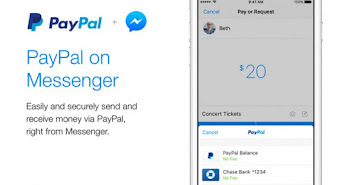
Finally, you can now request or send PayPal money to your friends, relations and colleagues all over the world using Facebook Messenger.

Messenger has a new feature that integrates the ability to send and request money on PayPal from right inside the app. Anyone will be able to send Paypal money using Messenger. In other words, there is no country restrictions on this for now.

HOW TO SEND PAYPAL MONEY USING MESSENGER

✔️ Login to your Facebook messenger account
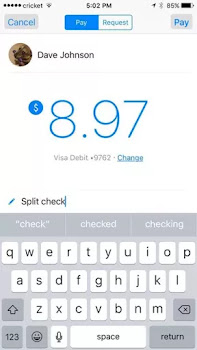
✔️ When composing a message in Messenger, tap on the blue plus icon
✔ Then select the green Payments button to quickly send or request money ✔️ Now you can choose PayPal as your funding source when making a P2P payment with their Messenger contacts.

Meanwhile, it's worth knowing that the new Paypal integration with Messenger is not yet available to all regions of the world. In fact, tje roll-out just started in the USA with only iOS users. But there is no cause for alarm as Android users and the rest of the world will get the new feature as soonest.

Recall, BBM has similar feature two years ago. With that, BBM users are able to send money to other users seamlessly.

INFORMATION

However, Nigerians are still restricted for receiving money via PayPal except you want to send. But hey! I have a good news for you, I will show you the secrete on how I receive PayPal money/funds here in Nigeria with Nigerian IP. Disregard all those people telling you to use VPN, it will backfire one day and the account will be limited. If you are interested, contact me with this WhatsApp number 080 6 2 2 76 490 for more details. Note, it will cost you a token. Welcome.

Laide Chat Bot Allows You Order Food, Movie Ticket, Buy Airteime & Data Easily

Laide Chat Bot is an utility robot that allows you order for food, movie tickets, buy airtime and even data plans easily via Facebook Messenger app. We are now in the bot era where bots are ruling and taking over. Be it in the telecom industry, banking, education and even sports, bots are installed to carry out some of the tasks that hitherto were done manually by men.

However, Laide is not just a name of a Yoruba pepper dem gang but the name of a bot to make your social life interesting and your daily life easier. Laide is an assistant that can help you buy airtime,data, order food, and buy movie and event tickets.

For instance, users can view descriptions and trailers before buying any movie tickets. For food, review menus and order food. All payments are currently handled by a PCI DSS (payment card industry data security standard) certified platform called Paystack.

Meanwhile, if you are buying airtime using Laide chat bot, you also get 5% cashback which you can use to pay for other Laide services.

KEY FEATURES OF LAIDEBOT

✔ Keep tabs on the latest movies showing in Cinemas all over Nigeria, and buy tickets for them easily and beat any "bad belle" queues that may be.

✔️ Find out about upcoming Shows, or Events and buy tickets for them.

✔️ Order Food! Yes! From our dear Ewa aganyin and infamous Jollof rice to spaghetti bolognese, from Chicken casseroles and other "medeh-medeh" to hot Afang soup. With top class restaurants, Laide's got you covered.

HOW CAN I USE IT?

To use Laide bot, checkout this link https://www.messenger.com/t/laidebot

Although bots make life more easier and task more faster but they are one of the reasons unemployment rate is higher this days. What do you think?

Download Unseen Apk To Hide WhatsApp, Facebook and Telegram Status

Unseen is an app that lets you read your friends messages on WhatsApp, Facebook, Viber, Telegram etc without them knowing. This means the Unseen app lets you read chats without any traces of last seen notice or blue double check lines signaling read. In other words, you can read friends messages anytime you want to read it in incognito mode, without them knowing you’ve read it.
Unseen app apk
If you are someone that receives so many messages everytime both important and unimportant ones, this app will be of help to you. It will also be useful to ladies that gets so many messages from different guys. It will allow you read messages without them knowing you have read them until you decide to reply them.

HOW IT WORKS

When you download the app, it will require giving it permission to have access to your contacts and messages as well as notifications from your popular social media handles.

Now, when you receive a message from one of these messenger apps, it will also be received in the Unseen application. There, you can read it freely, whenever you want, without having any of your friends knowing that you have seen it. Only when you will decide to respond, the « seen » or check-marks notice will be displayed.

NOTE: The app doesn't work with mod whatsapp like GBWhatsapp and OGwhatsapp.
Unseen app
HOW TO INSTALL IT
Download Unseen App Apk. It's available in Google Playstore.
✔️ Grant it access to access your contacts and you are all good to go.

At the moment, it has over 1million downloads on Playstore.

Facebook Messenger Lite Is Now Available in Nigeria + 150 Other Countries

Finally, the lightweight version of Facebook Messenger app is available in Nigeria plus other 150 countries and it is called Messenger lite. The app is faster, uses less data and works in all network conditions as it's designed for people using low-end android devices or people who feels the full-fledged version is heavy, slows their phone or consumes data a lot.
  1. Messenger Lite
    Messenger Lite 
Facebook launched this Messenger Lite in October last year, but up until this point it was available only for a few regions. The app is now out in 150 additional countries, including Nigeria, Germany, Colombia, Italy, Vietnam, Algeria, Morocco, Peru, Turkey, Japan, Taiwan and the Netherlands to mention but a few.

Messenger Lite, just like the Facebook Lite app requires less memory and processing power to operate, and it even uses less data than the regular messenger app. Below are some highlights of the features of this app.

FEATURES OF MESSENGER LITE

✔️ Installs fast – The app is smaller, so it downloads quickly and uses less storage space.
✔️ Loads quickly - You can send text, photos and links to anyone who uses Messenger, Messenger Lite or Facebook Lite.
✔️ Uses less data - Be more efficient with your mobile data and save space for other apps. Using less data will save you more money.
✔️ Works on all networks - It's designed for 2G networks and areas with slow or unstable internet connections. If you don't have a connection, your messages will be delivered when you have signal.
✔️ Works on most Android phones - you can use it on almost any type of Android phone, new or old, including Gingerbread.

WHERE TO GET IT?
Download Messenger Lite

There are more than 1million downloads already on Playstore.
Photo credit: google play

Is this helpful? Kindly help others know about this by hitting the Facebook, Twitter, WhatsApp share buttons below.

Download Go Multiple Apk To Use Two WhatsApp, Messenger Accounts In One Phone

And someone asked, I have two WhatsApp accounts, is there any way I can use the two accounts in one phone at the same time? Guess what😯, my answer was an emphatic YES! All thanks to an amazing app called Go Multiple. As the name suggests, it's an app that allows you run multiple Instant messaging apps on the same smartphone without conflicts or any issues. In other words, if you have two accounts for Messaging and tired to log in and out to receive different message, Go Multiple is the answer.
Download go multiple app
Go Multiple App
"GO Multiple" is developed for people who log in more than Two social Accounts of One App with only One Phone, while data of your main account and second account are in parallel and separate storage.

Features Of GO MULTIPLE App


✔️ One app, All message:
We support most Instant Messaging. Multiple accounts can work simultaneously on one device, connect different friends and share parallel information.
✔️ Double Game Experience :
You can open two game accounts for Google Play and get experience for both accounts at the same time! We now support 99% of top games!
✔️ Fast Switch between Interface
Upgraded UI, clear notification to help you fast switch between two accounts.
✔️ Parallel Function, separate storage, zero conflict!
✔️ Small and low CPU consume.
✔️ Privacy and Security

WHERE TO DOWNLOAD IT
Download Go Multiple Apk App

How To Use It


✔️ After downloading and installing the app, it will present you with options to choose the messenger you wish to add multiple accounts. At default, you have Facebook main app, WhatsApp and Facebook Lite but you can add more apps of your choice just below as you can see from this screenshot.
Go multiple accounts
Go Multiple Accounts 
✔️ Then select your preferred IM account and hit the enable button… complete the settings and you are good to go.

SEE ALSO... How To Run Multiple WhatsApp Accounts on iPhone

You can also download parallel space apk which is a related app.

You will surely enjoy it because Go Multiple is a simple application that allows you to run multiple accounts of any instant messenger, be it Facebook, WhatsApp, Instagram or twitter… you can even run games on the same device. It is an app that clones other apps in a more simpler way. So say goodbye to the days of limitations on running different whatsapp, Twitter, Facebook, Instagram accounts on one device.

Introducing Facebook Messenger 'M Assistant'

Facebook have introduced an Assistant feature called "Messenger M" as an on-screen AI to make messenger more easy to use and explore all of its features which users might not know.

Personally, I see this feature being very useful to newbies in Messenger as it won't be necessary for someone that knows his or her way about on the app.

In fact, it's similar to the AI google brought to its Allo App. The way it works is this; when you are using the app, the Assistant feature will be directing you on next steps to follow, it also brings out some of the features in the app relevant to your interests.

Below are Messenger M Features:

✔️ Sticker suggestions
✔️ Requesting or sending money
✔️ Location sharing
✔️ Making plans with a friend (sets a reminder for recipients of the chat)
✔️ making polls in group chats
✔️ Requesting a ride from Uber or Lyft

AVAILABILITY
As at the time of this report, Messenger M is rolling out to all iOS and Android users in the United States. Meanwhile, those in other regions are expected to get the update any moment from now.

In case you are not comfortable with this new feature, you can always turn it off directly from the messenger settings.

Facebook Messenger Introduces Mention and Reaction Features To Chats

You can now mention someone and send reactions on Messenger as facebook continues its quest to make messenger the best IM in the world. In recent times, Facebook Messenger has added so many features and the latest is the reaction and mention features which i believe will be of maximum interest to users.

HOW IT WORKS
You can now react to any single message in a thread, and select between seven different reactions to do so.
✔️ To add a reaction, press and hold any message and then tap to select one of the following emojis that show up: love, smile, wow, sad, angry, yes, and no. Note that those last two ones can also easily be interpreted as "like" and "dislike", respectively, given the fact that they're styled like a thumbs up and thumbs down.

SEE ALSO... How To Make Video Calls On Facebook Messenger

While you're in a conversation, you'll see reactions to messages in the lower corner, where you get a summary of how many people reacted. Tapping on that will tell you exactly who reacted how. And when someone reacts to one of your messages, you'll get a small animation. If you don't have Messenger open, you'll get a notification telling you that someone has reacted to a message of yours. Reactions will be available for all messages - text, stickers, videos, images, GIFs, and even other emojis. And all of this works in all conversations, be they one on one or of the group type.

**DON'T MISS... How To Mention Someone On WhatsApp

Mentions on the other hand are handy for group chats when you want to get someone's attention. Just type the "@" symbol followed by the first few letters of that person's name or nickname (just like WhatsApp). You'll get a list of people that you can pick from. Then write what you want and that participant in your chat will be notified that you've mentioned him or her. This will be achieved through a new type of notification, which lets them know that you called them out specifically.
ref

Facebook Is Bringing Chat Rooms To Messenger App

Facebook is currently testing Chat Room features on its Messenger app which will see the return or similar rooms like we see in Yahoo IM and even 2Go rooms. The Room is a board-style feature developed to let users chat with people outside their Friends circle but with similar or same interest on a particular topic.

According to product manager Drew Moxon,
"the new chat feature was made to prevent you from being annoying to your friends with interests that they don't share. Although Messenger users can already create groups, they are limited to being private conversations between friends."

HOW TO JOIN A FACEBOOK MESSENGER ROOM
To join any room, you just have to create (or search for) a room about a particular topic from inside the Messenger app.

Unfortunately, this feature is only available for people in Australia and Canada at the moment but it's highly expected to expand to other parts of the world very soon.

Hilariously, people have already created ‘rooms’ for topics like ‘butts.’ Imagine.

It will be fun and educative shaa. It all depends on your interest and the room you joined just like WhatsApp groups; there are educative matured groups as well as useless groups. It all depends on the one you joined.