Showing posts with label Free Browsing. Show all posts

7 Tips To Make Internet Connection Faster On Your Phone

Are you constantly experiencing slow internet connection on your phone? You can make it faster and improve the speed by applying the simple tips i will reveal to you on this article. Although most times slow internet connection is caused by the network providers due to poor equipment and stunted availability of the networking technology in some locations but you have your own part to play in order to boost internet connection.

First, you can check the speed of your connection here. Below are the seven (7) tips to make Internet faster on your smartphone.

7 WAYS TO MAKE INTERNET CONNECTION FASTER


1. Set Your Network Connection to 3G or 4G

It is not news that 4G and 3G network modes are much faster than EDGE and 2G networks mode. One babe using very nice smartphone came to me and was very worried that her phone doesn't brows fast. In fact that she finds it difficult to upload photos on Facebook. She even suggested selling the phone thinking that it was a fault but when i collected the phone from her to check things out, I noticed this babe is on 2G network for many weeks and she wasn't even away that it can be changed. Then i switched her to 3G and the network connection improved drastically. You see, some few phone users are ignorant of this.

So to speed up your data connection speed, you need to change your preferred network connection to 3G, WCDMA or 4G instead of GSM or EDGE

2. Uninstall Unnecessary Apps

Are you aware that many Android applications uses internet connection to work and to make things worst, some uses the Internet in background even when you aren't using the app. These apps drags the internet with other more useful apps which you constantly use on your phone so why allow such apps to remain installed in your phone?

I advise you to uninstall all the apps you don't normally use because they don't only slows the Internet connection but also makes your phone's performance slow as well as zapping your data unknowingly.

SEE ALSO... Test Your Internet Speed With This Fast dot Com

3. Clear the Cache in Your SmartPhone

This one might be controversial because in most cases, cache boosts internet speed especially with web browser apps, WhatsApp and Facebook. This is because these apps don't need to reload those saved data once you launch them thereby saving the time internet requires on your phone for processing information. But in some rare cases, cache can work alternatively so you might consider clearing cache memory.

Interestingly, clearing cache helps boost your phone performance as well as giving you more phone memory space especially if you are always short on device internal storage. To clear cache, go to phone Settings > applications > select apps > tap on clear cache. Note that this step might be slightly different from phones with different OS versions.

4. Activate Text only Mode in the Browser

I could remember some years back when I was using the 10mb data allocation from MTN to browse on opera mini using Nokia Symbian phone. Surprisingly, that 10mb serves me for complete one week because i usually browse without images turned on.

So if you are in a situation that demands you must read something online with very low data size available om your phone, just enable "text only mode" and restrict background data on your android phone. You will see the magic of what 5MB can do.

Apart from that, when you disable images from your web browser, your internet connection speed increases drastically but the browsing experience is not that cool. So if you are don't have problems browsing without images displaying or if you have very little data on your phone, apply this simple trick; otherwise, browse normally with images and enjoy what you are reading.

5. Use a Faster Web Browser on Your Phone

The web browser you're using plays a major role in enhancing the overall internet connection speed in your phone. There are many fast web browser available on Playstore for you to download and make use of.

You can try out Opera Mini, UC Browser, Google Chrome and Puffin Browser. They are arguably the most popular web browsers out there so try using them for browsing.

6. Install Internet Speed Boosting App

There are many internet speed boosting apps on Playstore. Try downloading any of them to help in boosting internet connection.

SEE ALSO... Download Internet Speed Meter Lite Apk

7. Turn Off and On Your Internet Connection

Lastly, to speed up your phone internet connection speed, toggle the data switch to ON and OF it. Alternatively, enable "flight mode" and disable it again after 3 seconds. As weird as it sounds, this is one of the beat working remedy to combat slow internet connection.

Once you apply this trick, you should experience an improved connection but remember all the above tips doesn't apply to people staying in areas with no network signal at all (if there is such places)

So ladies and gentlemen, there you have it. I hope this will help to solve the problem of slow internet connection speed on your mobile phone. Help other people with these tips by hitting the SHARE buttons below.

2018 CHEAT: Enjoy Airtel 2GB for N100 When You Port Your SIM

Hello guys, I am still posting this Airtel SIM Porting cheat because it is still working and in fact legit. Many smart guys had already ported and enjoying the benefits. You get 2GB for N100 when you port your Airtel SIM with other networks especially MTN and the data lasts for 30 days.
Airtel Sim port
The most interesting part of this trick is you can even accumulate the data. In other words, the more you recharge N100, the more you get 2GB added to your line. With this you can get 4GB for N200, 10GB for just N500, 20GB for N1000 and so on.

The Airtel SIM porting process is free of charge but you have to adhere to the official guidelines from Airtel in order to make it a success. You must also load your recharge cards via Zoto app or through Bank mobile recharge. Else you won't get the 2GB data bonus. Just follow the procedures below.

REQUIREMENTS
✔ Valid ID card (Voters card, drivers license, etc)
✔️ Registered Sim You want to port (MTN works better)

HOW TO PORT FROM OTHER NETWORK TO AIRTEL NETWORK

✔️ Locate the nearest Airtel office around you with the above requirements.
✔️ Tell them you want to Port your existing sim (any network) to Airtel
✔️ They will present you with a form to fill (Follow Customer Care Procedures)
✔️ After that, you will receive an SMS from Airtel on the old/existing operator SIM telling you (You wish to port your line)
✔️ At this stage, you may not see service in your phone for about 2 hours. It's a ‘no service period’ which will begin after the porting time.
✔️ Now reboot your phone as soon as the old operator Network signal has disappeared.
✔️ After the ‘no service period’, you can replace your existing operator’s SIM card with the new airtel SIM card in your handset.

At this juncture, Airtel will send you a confirmation message that your sim has been ported.

The above procedure is the main important part of this tutorial and if you have completed it, you are 90% done. Follow the final stages to complete the process and start enjoying.

HOW TO GET AIRTEL 2GB FOR N100
✔ Load a N100 recharge on your new Airtel ported line via Zoto App or Online banking app. PLS NOTE that you should not buy a recharge card 💳 else it won't work. Only recharge via the methods above.
✔️ You will get 2GB data after recharging and it valid for 30 days
✔️ The more you recharge with N100, the more data you accumulate. Meaning you can accumulate upto 20GB for N1,000.

To check your data balance dial *223#.

This is not actually a cheat that requires changing of IMEI or using Psiphon and other VPN to power but it looks official. It's just a simple application of trick. MTN works best for this.

New Working IP/Server for Shadowsocks VPN

Shadowsocks is the latest VPN app working with 9Mobile 0.0KB cheat and as you all know, the app requires a valid server (IP) for it to establish connections. So I have some newly generated working IP, server and ports for Shadowsocks VPN which should make the app connect and power all apps on your phone.
Shadowsocks VPN
WORKING IP/SERVERS FOR SHADOWSOCKS VPN CHEAT

✔️ IP: 52.186.124.212 Port: 3128
✔ IP: 50.232.30.218 Port: 3128
✔ IP: 209.239.122.200 Ports: 443
✔️ IP: 76.14.210.52 Port: 80
✔ IP: 70.169.70.90 Port: 80
✔ IP: 47.88.102.224 Port: 3128
✔ IP: 107.17.2.13 Port: 8080
✔ IP: 47.88.32.46 Port: 3128
✔ IP: 165.227.53.107 Port: 3128
✔ IP: 24.42.167.242 Port: 3128
✔ IP: 50.203.117.22 Port: 80
✔ IP: 107.20.251.127 Port: 8080
✔ IP: 69.144.49.11 Port: 8080
✔ IP: 108.18.22.106 Port: 3128
✔ IP: 34.211.100.239 Port: 8080
✔ IP: 104.130.246.8 Port: 80

NOTE: I noticed this app works better on rooted phones. I mean, there has been series of reports from users on our Telegram Group who revealed that Shadowsocks connected on their phone but unable to power any app while some people said it powers only Facebook, Telegram and whatsapp.

READ ALSO:
Shadowsocks Settings for 9Mobile 0.0KB Cheat
Free USA Proxy Servers and Ports for Hiding Your Location with VPN

But most people with rooted phones said it's working fine for them. So if yours stops anytime or if it's not fast as you want, you can consider using one of the IP and ports listed above. Let me see your results by commenting via the comments box below.

Glo Overloaded Free Data Day Is Back This September 28

Recall Globacom introduced free data day last month August 11 in Nigeria but it was bitterly stopped by Nigerian Communications Commission (NCC) few hours before the commencement day. It was a very big disappointment for most Nigerians who were eager to explore the opportunity to browse free for that day.
Glo free data day
However, the good news is that Glo "Overloaded Free Data Day" is back and it will hold by September 28, 2017. Globacom is currently busy running adverts as regards to this offer which will be available exclusively for Glo subscribers. For more information, questions and answers as well as procedures on how to participate and enjoy this offer, continue reading.

On Glo free data day, you enjoy up to 200MB worth of data to browse your favorite websites, chat and stream videos but customers need to meet set of voice and/or data usage threshold within 7 days to the free data day.


ARE YOU ELIGIBLE FOR GLO FREE DATA DAY?

To be eligible, you have to do either of the following in the 7 days preceding the announced Free data Day:

✔ Use N150 or more on voice calls PLUS 100MB or more of data OR
Use N250 or more on voice calls.


If you meet the above requirements, you will receive an SMS announcing your eligibility for the free data day.

GLO FREE DATA DAY FREQUENTLY ASKED QUESTIONS (FAQ)

✔ What is the Glo Free Data Day offer? It is an offer which rewards Glo customers Free Data for a whole day when they meet set voice and/or data usage threshold in the week preceding the free data day.
Customers enjoy the free data on that day without any need to opt in or subscribe.

✔️ Who is eligible for this offer? All Glo customers who meet the set threshold.

✔️ How do I know the Free Data Day? You will receive an SMS from Glo announcing the forthcoming Free Data Day

✔️ What do I need to do to enjoy this offer? Once the Free Data Day is announced, ensure you use either of the following in the week (7 days) preceding the free data day: ➢ Minimum of N250 on voice calls OR ➢ Minimum of N150 on voice and 100MB data from any (or a combination) of : I. Pay as you use II. Existing data plan

✔️ Do I need to opt in or subscribe to Free data day before I can enjoy free data on that day? No you don’t have to dial any code to opt in or subscribe in order to enjoy free data day. Just ensure you spend N250 or more on calls within 7 days to free data day OR you spend at least N150 on calls and use a minimum of 100MB within 7 days to the free data day.

✔️ How will it be announced? It will be on the media communication channels. In addition, SMS will be sent to create awareness and encourage customers to achieve the threshold in order to get the Free data

✔ Is there a way to monitor my voice and data usage? E.g. by dialing a code? Not yet available. But you can monitor your Main account depletion through #124*1# after making calls or using data.

✔️ What is the volume of data I’ll get on that day to browse for free? A whooping 200MB is what you get to enjoy on that day

✔ How often can I get the offer? Once a week? Announcements will always be made via SMS to herald the free data day.

✔️ What if I use less than N250 on voice in 7 days before the Free Data Day? You will not get the free data on the designated day

✔ Will I qualify if I recharge N250 or more within the 7 days? No you will not. It is either you use: I. N250 or more on calls ONLY OR II. You use at least N150 on calls PLUS at least 100MB within the 7 days
What if I use N100 on voice and more than 100MB on data? You will not get the free data on the designated day

✔ What if I used my N250 on data only? You will not get the free data on the designated day

✔ What if I use N250 on voice and SMS? You will not get the free data on the designated day because SMS usage is not one of the qualifiers

✔ What categories of calls are recognized as voice usage? Calls made from Main account to Glo line, non-Glo line and International destinations.

✔️ Will calls made from bonus account qualify for free data day? Calls made from Bonus accounts will not qualify for Free Data Day

✔ Will data usage from pay as you use on data qualify? Data usage of 100MB or more from PAYG within 7 days to the Free Data Day plus at least N150 voice calls usage within the same 7 days period will qualify for free data on the designated day

✔ Will data usage from existing data plan qualify? Data usage of 100MB or more from an existing data plan within 7 days to the Free Data Day plus at least N150 voice calls usage within the same 7 days period will qualify for free data on the designated.

✔️ What happens on the Free data day if I’m already enjoying a purchased data plan when I received the free data? The free data bundle is credited to your account with 24hrs validity and gets consumed first before your purchased data plan.

✔️ What happens if I do not have an existing data plan when I received the free data? The free data will be credited into your data bonus account and available for use on the free data day.

✔️ What is the validity of the free data if I do not have an existing data plan? The validity expires at 23:59 on the free data day

✔ Do I have to be on a specific profile or plan to get enjoy free data day? No. All customers on Glo network are eligible once they achieve the set usage thresholds.

✔️ How do I know that I have received the free data? You will be notified via SMS
How do I check my Free Data Day balance? Dial #122# to check your Free Data Day balance if you do not have an existing data plan OR dial ***170*0#** if you have an existing data plan

✔ What if my Free Data Day account validity period expires? Any unused free data day bonus balance from will be lost upon expiration of validity period.

✔️ What if my Free Data Day bonus gets exhausted before its validity period expires? Subsequent data usage will be from Main account at pay as you go rate of N1 per MB Or from your data plan if you have a purchased data bundle running

✔ Will I get notified when the free data bonus is exhausted? Yes you will get notified when you have exhausted your free data bonus

✔ Can I share my Free Data Day bonus with another Glo customer? NO, you cannot
Can I gift out my Free Data Day bonus? NO, you cannot

✔ What happens if I migrate to another tariff profile? Any unused free data day bonus balance from the previous profile will be lost upon migration.

Are you ready

Surfwella To Launch Free Wi-fi In All Nigerian Universities Beginning From Today

An INDIGENOUS 4G provider, Cyberspace Network Limited, will be launching Free wi-fi network in all universities in Nigeria. They already started with University of Abuja yesterday.

The free Internet wifi started first with the University of Abuja before stretching to other universities.

ABOUT SURFWELLA
Surfwella is a Corporate Social Responsibility (CSR) initiative of indigenous 4G operator, Cyberspace Network Limited, and a veritable platform for social and cognitive computing.

According to the chief marketer of surfwella, the service will be on “no payment, no subscription, no data purchase, and no need for modems basis”. Every surfing will be absolutely free.

The company further revealed its plan to build another free Internet infrastructure for Lagos State University (LASU) in the next few week, and quickly followed by College of Agric, Lafiaji, and University of Lagos (Unilag).

Honestly, this is the kind of news we want to be hearing or reading in Nigeria. Let's just hope they fulfill this their promise of setting up free wifi network in all universities in Nigeria. What do you think?

Activate Awoof MTN 100MB Now, Accumulate Up To 1GB

Yes you heard me correctly, don't let this opportunity pass you by. You can now activate awoof MTN 100MB to browse with your phone and PC. Just continue reading to see how to get it.

Remember, I posted similar article some months back that MTN is giving away free 100MB for subscribers who downloaded their official app right? Well, MTN has released a new method the free offer and it's exclusively for those who download the MTN Myapp application.

Meanwhile, here is how to activate and accumulate the offer up to 1000MB (1gb) without downloading the application because you get 100mb once you download the app. So follow this method below to get more than the stipulated 100mb.

How to Activate and Accumulate up to 1000MB (1GB) from MTN Myapp Bonus Offer


To Activate
✔ Open your SMS app and send XXXXXHSHSMyappHSHS to 131 as a text message.
✔️ after that, you should get a notification about the free 100MB like this;
Dear customer, You now have a bonus of 100MB valid for 3days for downloading MyMTN App. Kindly dial *559*4# to check balance.


Now that you have gotten the free 100mb data, you can accumulate it to get up to 1gb by following the below steps...

How To Accumulate It


✔️ To accumulate the data, dial *123*5*7*3# and select 1 to proceed,
✔️ Select 1 again to choose "Myapp" and select 1 to finally unsubscribe.
✔️ Next, resend XXXXXHSHSMyappHSHS to 131 for another free 100MB.

Just continue repeating the process above and you'd keep getting free 100MB till 1GB. Once you get up to 1gb, please stop or the whole data will be wiped out from your SIM and am sure you wouldn't want that to happen.

Unfortunately, for now, there is no method to check the accumulated data balance. Anyway, enjoy while it lasts.

Free Wifi Now Available In Lagos Motor Parks For You To Connect

The Lagos State government in a partnership with MainOne Cables has unveiled a free public Wi-Fi Internet service initiative starting with the Ndubuisi Kanu Park, Alausa, Ikeja in the Governor's quest to make Lagos a smart city even more than what it used to be.

Governor Ambode also made it known that virtually all the parks in Lagos would have the free Wi-Fi Internet access facility.
Lagos free wifi
You may recall that this is not the first time Lagosians are being offered “Free internet” (cc @Donjazzy’s Flobyt), but this time around, the Lagos State Government’s major motive is different — Operation “let us make Lagos a smart city.” you can also read about Lagos free wifi from Donjazzy

According to Governor Ambode via the Commissioner for Science and Technology, Olufemi Odubiyi:

“It is consistent with our commitment to make Lagos work for all. Parks and gardens have been established in different parts of the state to provide a conducive environment for recreation and relaxation.

As you relax and enjoy the recreation facilities in these parks, we are also making it possible for you to access your email, browse and search the internet on your tablets, smartphones and laptops, via a reliable public Wi-Fi.

As I launch the free public Wi-Fi in this park, it is my belief that this service will enhance productivity and add value to all our parks and gardens.”

Let's see how this turn out. Lagos Governor is currently one of the best performing state Governors in Nigeria and he is not showing any sign of lagging behind in his quest to make the state more better.

How To Watch or Stream YouTube Videos With Airtel Social Bundle Data

I know by now you have gotten as many data as possible via the Airtel Social Plan Cheat but still unable to use it on some stuffs like streaming videos on YouTube. Although, last time, we provided a solution on how to use the free social data to browse using opera mini and roogen proxy server. Otherwise, the data is only used for chatting on WhatsApp, Facebook and other social apps. So we will be looking at how to start watching YouTube video with it.

To make this possible, we will be using new different Opera browser this time, (not the regular Opera though) it is called Opera 4.1 native browser which has several high-end features such as ability to increase data usage, disable adblocker, and even stream videos online which is very difficult for opera mini.

I don't know about you but some followers of this blog yesterday told me that Airtel wiped their data but mine is still much intact. I don't even have time to use it very well. Just stream videos for some minutes when am less busy so I will advise you to try and enjoy yours now before it's gone. If you have the opportunity and free time, you can be watching your favorite videos with it by following the below guidelines.

HOW CAN I STREAM VIDEOS WITH AIRTEL SOCIAL PLAN?

✔️ Download native Opera browser v4.1

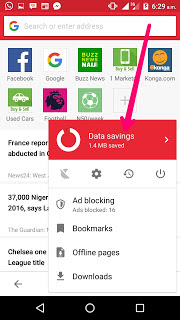
✔️ After downloading, launch the browser and tap on MENU and tap on DATA SAVING.

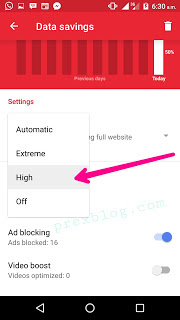
✔️ Then select HIGH. under SETTINGS

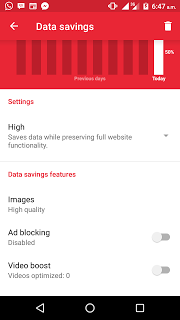
✔️ Next, tap on "disable Adblocker."

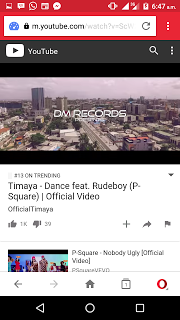
✔️ Finally, go to http://youtube.com and start streaming/watching your favorite videos.

Are you still confused? Feel free to ask questions and get more guidelines. How much MB did you accumulate with this cheat?

What I Noticed About Etisalat Daily 60MB Free Browsing Trick

Ever since Etisalat remote tweak unlimited free browsing trick was blocked, most people reverted to the 0.00kb 60mb daily free browsing but I noticed something different from usual. I don't know if you noticed similar change too.

What I noticed? Well, I observed the 0.00kb cheat is no more up to 60mb, not even up to 40mb sometimes. This tweak has been available since last year and it has helped so many people especially those who couldn't afford data plans on frequent basis.

So I want to know if any of you noticed the same change. Remember Glo 0.00kb is an alternative to this Etisalat cheat. In fact, the glo cheat is unlimited but the drawback is poor network in most areas. Only God knows when Glo will fix their network wahala.

Having said that, I still believe that half bread is better than non. Even the free 40mb will be enough for some people to chat, Facebook and read stuffs online pending the time a better tweak is released here on this blog. Happy browsing😁

Now That Etisalat Remote Tweak Has Stopped, What Next?

Last night, Etisalat Remote Tweak Unlimited Free Browsing stopped working on both stark VPN and Tweakware but few people regretted it because a great number of people on this blog really enjoyed the cheat. Many used up to 15gb before it was blocked last night.

The question now is what next should you do now that the remote tweak has been blocked? What are the other free browsing cheats that are still blazing? Oh yes I know that the remote tweak cannot be compared with any tweak at the moment but they should work as alternative pending the time new unlimited fbt is discovered.

ALTERNATIVES TO ETISALAT REMOTE TWEAK
Looking for other ways to brows with your phone for free? Yes there are other alternatives like the etisalat 0.00kb Cheat. You can click here to see the settings and how to use it with stark VPN.

Another alternative is the Glo 0.00kb cheat, although this one is not enjoyed by many Nigerians as glo network is generally poor but if you are lucky to be staying in area with very good glo network, you can opt for it. Click here to see how to enjoy this cheat on stark vpn.

For now, those are the available cheats, though airtel is still blazing but let's continue enjoying these once. Did you enjoy the remote tweak from Etisalat? How many megabytes or gigabytes were you able to use when it was working.

South Africa Cell C Free Browsing Cheat With WhatsApp Bundle Via Psiphon

South African Cell C free internet browsing with WhatsApp bundle is now achievable with the help of Psiphon VPN. Cell C is one of the top mobile network provider in South Africa, offering a wide range of services and mobile and data deals which include unlimited whatsapp bundle which allows subscribers to chat on WhatsApp but unable to browse through with web browsers and other apps that needs data network to work.

However, if you really want to access other web pages and applications with the WhatsApp bundle, I have provided the settings that will make it work. After applying these settings, you should be able to enjoy free internet with Cell C South Africa network.

Previously on this blog, we have already posted Psiphon V5 free Internet trick on Cell C and XP Psiphon free Internet via Cell C in South Africa so you can check those ones out as it's still working.

Meanwhile, If you happen to be among those that are finding it difficult to use other free browsing tweaks for SA, I advice you to try out this WhatsApp trick. Here is the settings.

PSIPHON SETTINGS FOR CELL C WHATSAPP FREE BROWSING

✔️ First of all, download Psiphon Pro and launch it
✔️ Then enter these settings
✔️ Proxy type- real host
✔️ Proxy server- https://web.whatsapp.com/%F0%9F%8C%90/en
✔️ Real proxy type- default
✔️ Real proxy port- 80
✔️ Now click on save

After that, select UNITED STATES or BEST PERFORMANCE in the preferred region tab

✔️ Click More Options and tick HTTP and enter any of these IP addresses below

HOST ADDRESS: 47.52.33.136
PORT– 3128

Finally, click on the start button and just wait for the Psiphon to connect. Now you can open any app even your web browsers such as Opera mini and UC browser using the WhatsApp bundle. Happy browsing!

Download WizyTechs VPN (Tweakware Mod Version)

After the release of Psiphon version of WizyTechs VPN, Gurusniskid has moded the Tweakware VPN version for with tweaked regions and beautiful design. Am impressed at what he did willingly for this blog and its readers. Remember this is just a tweakware app in another clothing.

This VPN powers all apps on your phone and it has all the currently working free browsing cheats and servers for you to enjoy. It's easy to use with great user interface. No cumbersome settings. Just as simple as clicking on the cheat you want to use and the server/region of your choice. It can be used for Glo 0.00kb free browsing, Etisalat 0.00kb free browsing, Etisalat socialme and SmartPak browsing tricks etc.

WIZYTECHS VPN PRO
Download Wizytechs VPN Pro Here

✔️ Open the Wizytechs vpn Pro
✔️ Select any tweak (I.e for etisalat socialme)
✔ ️Select etisalat chatpack 2017 or any other cheat on the list
Tap switch button icon and you should be connected.

HOW TO SUBSCRIBE FOR THE SMART PACK WITH 150# AND 500#

1. Migrate to Etisalat easycliq by dialing *244*1#

2. Subcribe by dialing:-

For weekly dial:- *343*6*10# N150 will be deducted

For montly dial:- *343*6*11#
N500 will be deducted

To opt out dial *343*6*0#

To enjoy other cheats from other networks with this VPN, just select the cheat of your choice and connect.

PRECIOUS VERSION

WHERE TO DOWNLOAD IT
Download Wizytechs VPN Here

HOW TO USE WIZYTECHS VPN
Now to use it for the active free browsing Tweaks at the moment;

FOR GLO 0.00KB CHEAT
Make sure you don't have any active data on your sim, not even an airtime. It must be 0.00kb in your balance.

✔ Send PAYU to 127
✔ Put your phone to airplane mode for 1min and off it back
✔ Instal the VPN app from the link above
✔ Press option
✔ Press Wizytechs settings
✔ Press bundle settings
✔ Press the box
✔ Press bundle
✔ Select glo0.0k

Go back and choose any server, then press CONNECT

In case you see maximum users
then choose the server one by one until it connects

SETTINGS FOR ETISALAT 0.00KB CHEAT
✔ Install the VPN app from the link above
✔ Press option
✔ Press Wizytechs settings
✔ Press bundle settings
✔ Press the box
✔ Press bundle
✔ Select eti 0.0k
✔ Go back and choose any server of your choice
✔ Press connect

In case you see maximum users
then choose the server one by one until it connects

Note:
This etisalat capped 60mb daily limit so I advise u, don't use it to download more files with big MB per day.

Download Tweakware V5.5 For Etisalat & Glo Free Browsing Cheat

Latest Tweakware version 5.5 comes with Glo and Etisalat free browsing cheats and you can download it either via google playstore or other links. It fixed the glo cheat that usually disconnects so you should give it a try if yours was having issue before now.

Tweakware is one of the popular VPN apps very easy to configure and use as the tweaks available are already pre-configured for you. So no need for IP and proxy servers as you would do on Psiphon.

With Glo 0.00 cheat, you can browse unlimited using this version as I have tested and confirmed it blazing. So sit tight as i show you the working settings and guide to browse free on Glo network.

Glo 0.00kb cheat has been around for so many months making it one of the oldest tweaks that refuses to stop although few people aren't enjoying it because of poor network in their location. But be that as it may, we will go ahead for those that are blessed with glo network.

GLO FREE BROWSING SETTINGS FOR TWEAKWARE V5.5

REQUIREMENTS
✔️ Your Glo sim with no active Data plan and Airtime
✔️ Your Android device
✔️ Tweakware v5.5 - download from playstore here or the direct Apk here

APN SETTINGS
✔️ Name: wizytechs
✔️ APN: ntel
✔️ APN Type: Tick Default & Supl
✔️ Proxy: leave it blank
✔️ Port: leave it blank
✔️ Username and password: leave it empty

Once you have done that, follow below steps

✔️ Launch the Tweakware app

✔️ In Server list, select any free server in the dropdown if you are not a premium user.

✔️ On the Tweaks list, select "Glo 0.0k".

✔️ Now, Tick the box beside Tweaks, to enable it.

✔️ Then tap on "Connect"

Once that is done, it will connect within 12 seconds. You can now start browsing by opening your web browser or any other application on your phone.

To browse unlimited with the glo, you need a Premium/Upgrade account on tweakware but you can still use the free servers without upgrade/payment but your data will be limited per day on free servers.

To be a Premium user, it will costs only N500 and you will have access to all the servers without any data limit.

ETISALAT FREE BROWSING VIA TWEAKWARE V5.5
The same procedure is needed for browsing free on etisalat via tweakware as the settings are already pre-configured. Just select the etisalat tweak as your preferred tweak and you should be connected. Note that you need go activate Etisalat chatpak before you can use it on tweakware. See how to activate chatpak here but if you selected the etisalat 0.00kb cheat, then you don't need to activate smartpak but you will only use 60MB free daily.

That's it guys... Are you still confused? Let's discuss via the comments section. Happy browsing.

Etisalat FreeBasic: You Can Now Access Facebook And Other Sites Free of Charge

Good news, Etisalat Freebasic services is now available so you can start browsing Facebook and some other websites free of charge with your Etisalat SIM without subscribing for data or buying airtime.

With this, Etisalat becomes the second Mobile network provider to support the freebasics initiative by Facebook/ internet.org. This service allows Internet users from some select countries
(Nigeria inclusive) to access popular web-
based services for free.
In Nigeria users can access Facebook, FB
messenger, supersports, nairaland.com, jobberman and lots of other websites for
free on Freebasics.

To view full list of supported websites you can browse free, download the freebasics app or simply click here for full list. Alternatively, you can visit http://0.freebasics.com

I think this is a welcomed development as it will really go a long way to serve some people. Although images are removed when using free basic but it's still manageable especially to read news and get information from sites like Nairaland whenever you run out of data plan.

Free basic on Facebook is not that awesome because the beauty of Facebook is the pictures, video and other media stuffs. So if you are okay with that, you can go ahead and use Facebook free of charge (without images). It's now left for MTN and Glo to follow suit.

60 Valid IMEI Numbers For Etisalat Free 1GB Data

Hi, in case you are yet to get the free Etisalat 1GB data, here is the list of IMEI numbers for you to tweak and get yours now. No dulling because this tweak is still blazing and more people are getting their free 1gb data as am writing now.

VALID ETISALAT 1GB IMEI NUMBERS

  • 359838075475087
  • 359838075475033
  • 359838075475227
  • 359838075475078
  • 359838075475632
  • 359838075475298
  • 359838075475026
  • 359838075475027
  • 359838075475029
  • 359838075475011
  • 359838075475905
  • 359838075475998
  • 359838075475997
  • 359838075475968
  • 359838075475956
  • 359838075475904
  • 359838075475947
  • 359838075475903
  • 359838075475921
  • 359838075475989
  • 359838075475022
  • 359838075475009
  • 359838075475235
  • 359838075475020
  • 359838075475635
  • 359838075475053
  • 359838075475046
  • 359838075475065
  • 359838075475020
  • 359838075475088
  • 359838075475905
  • 359838075475989
  • 359838075475986
  • 359838075475945
  • 359838075475937
  • 359838075475954
  • 359838075475990
  • 359838075475967
  • 359838075475921
  • 359838075475962
  • 359838075475078
  • 359838075475009
  • 359838075475390
  • 359838075475456
  • 359838075475671
  • 359838075475053
  • 359838075475095
  • 359838075475065
  • 359838075475020
  • 359838075475011
  • 359838075475975
  • 359838075475976
  • 359838075475986
  • 359838075475945
  • 359838075475937
  • 359838075475998
  • 359838075475967
  • 359838075475978
  • 359838075475990
  • 359838075475956
To know how to get the data after tweaking, click here

The above IMEI numbers were just analyzed and you can tweak them as e de hot. More people are tweaking at the moment so be fast before the are all taken. Wondering how to tweak? Click here for guide.

How To Get Etisalat 1GB Via IMEI Tweaking For Free Browsing On Phone & PC

Using Etisalat? You can now enjoy free 1GB worth of data when you tweak the IMEI numbers i will drop for you here. This tweak actually came out few days back but i wanted to get more proves and success in the tweaking before I publish it here and am happy to let you know that this cheat is real
etisalat free 1gb
Interestingly, this data works on all devices including java and PC once you have gotten on your Etisalat SIM. It works on both old and New Etisalat lines so I think everyone is eligible for this offer.

Without wasting much time, shall we go ahead to drop the valid IMEI numbers for Etisalat 1GB data tweak. Oh yea... I think you are ready.

IMEI NUMBERS FOR ETISALAT 1GB FREE DATA
  • 359838075475063
  • 359838075475009
  • 359838075475238
  • 359838075475000
  • 359838075475671
  • 359838075475053
  • 359838075475046
  • 359838075475065
  • 359838075475020
  • 359838075475011
  • 359838075475905
  • 359838075475993
  • 359838075475986
  • 359838075475971
  • 359838075475937
  • 359838075475954
  • 359838075475947
  • 359838075475903
  • 359838075475921
  • 359838075475962 
To see more IMEIs click here

I guess tweaking IMEI shouldn't be a problem to most of you as it's one of the oldest and simplest tweaks on Android phones. Anyway, should you find it difficult tweaking or you are new to IMEI tweaking, kindly click here to see how to tweak

HOW CAN I ACTIVATE ETISALAT 1GB

✔️ Firstly, you have to Analyze and tweak/change your imei to the IMEI number above with imei analyser and mtk engineering mode, you can get it from playstore.

✔️ After that, dial this code *8186*092840413028038#

You can dial it as many 10 to 20 times.

✔️ Then you will receive this message saying
Congratulations! Your free 1GB data has been successfully activated, data is valid till 11/03/17.
CAN I GET MORE THAN 1GB?
Yes you can accumulate and get more than 1gb by repeating the steps above.

You can also try this one below
Imei: 354110082967240 but change d last 4 digits.
After tweaking dial *8186* 877653860576068#

Note that some of the IMEI above might have been used by others so if after tweaking and you didn't get a successful result, kindly analyze the IMEI and tweak again. Good luck and happy free browsing.

Latest Etisalat SmartPak Free Browsing Via This XP Psiphon Settings

Hello guys, Etisalat SmartPak unlimited free browsing cheat is back again this time on XP Psiphon (one of the trusted FBT vpn). Don't get it twisted, the 'free browsing' tag doesn't mean it's completely free because you have to subscribe for the smartpak with a little money but trust me, what you gain is far more better. That's why i called it free browsing because it's almost free of charge.

As of 2015, Etisalat SmartPak and socialme paks were the trending cheats as they lasted for almost one year. We were all using it. With just N150, you browse and download unlimited until the validation period reaches. Most of us utilized the opportunity to download as many stuffs as possible online. Thanks to Psiphon pro lite, simple server(now netloop) and Tweakware that time.

Meanwhile, Etisalat noticed the loophole and decided to add speed throttling after using certain amount of data. Like that one wasn't enough, they drastically reduced the data allocation of the plan to something very poor. That was how it ended.

Fast forward it to this year 2017, the etisalat smartpak cheat is back and working again on android devices; thanks to XP Psiphon VPN app. So without wasting much time, let me show you how to setup the the app in order to enjoy this cheap awoof free browsing.

HOW TO ACTIVATE ETISALAT SMARTPAK FREE BROWSING VIA XP PSIPHON

✔️ First of all, make sure you are on Easy cliq tariff plan (Migrate code *244*1#)
✔️ After that, dial *200*3*3*1*2*1# to activate Etisalat Chatpak weekly for N150.
✔️ The download XP Psiphon VPN Here and install on your Android device.
✔️ After installation, launch XP Psiphon and click 'Menu' at the top left side of the app
Then click on 'XP generator'
Use below settings in the XP Generator settings:

URL/Host: viber.com
Proxy type: Real Host
Now click on "Generate"

Finally, under server, set as "Best performance"
Then hit the Connect button. Watch it as it connects after some seconds. You can now open your browsers and start browsing.

To use it on PC, click here

Are you still confused? Feel free to ask your questions and we will attend to you. You might be wondering if it's capped, well it's capped but am yet to know the actual data cap. Daily and monthly pak cheats coming soon. Keep tuned to this blog as I keep you updated with the latest. Happy browsing.

A Closer Look At Airtel 1GB For N100 Weekend Data Plan

Airtel 1GB for #100 plan is one of the best data bundles from Airtel but it is usable only on weekends. It is good to always keep you abreast of the best data plans to go for at one point in time or the order and this one is just one of them. I posted this data plan sometime last year but some people started asking me if it's still working.

The airtel 1GB for #100 weekend data plan is still working as of today hence, we will be reviewing it once again. I know some of you who are new to this blog WizyTechs are not aware of this plan but those that has been following us should be familiar with this.

Airtel is one of the best networks when it comes to data and browsing unlike Glo that has poor service in many areas so this bundle should serve you very well as long as the network is stable. Imagine enjoying 1GB as cheap as 100 Naira. Okay what if i told you that you can also enjoy a whooping 7GB of data for as low as 700 Naira? Sounds interesting right? Well, if you are interested for that, click here

Meanwhile, this plan works on weekends. Meaning it only works on Saturdays and Sundays. Once you activate it, you will be given 1024MB (1GB) and will be used only on weekends. I usually make use of this plan whenever i want to download files since MTN 0.00 Free browsing stopped working. Although, there are other free browsing cheats working as of today and you can check them out here

HOW TO SUBSCRIBE OR ACTIVATE AIRTEL 1GB FOR N100
Recharge N100 on your airtel sim and dial this code *474*1# to subscribe and your data will be activated

HOW DO I CHECK MY DATA BALANCE?
To check your data balance, dial *140#

NOTE
Some SIM card will be stubborn to activate and after dialing the code, you would see "not eligible". If yours is among this set of airtel SIM, kindly call airtel customer care and tell them to activate your line for 1gb for 100 naira weekend plan. You can contact them using any of their social media platforms (facebook and twitter preferable for fast response). It is official but please don't call them for any unofficial plans!

READ ALSO 📖
How To Get Airtel 6GB Data Plan On Your Device

How To Use Airtel Blackberry Plan On Android And PC

Is this helpful? Kindly SHARE it with your friends on facebook, twitter etc and let everyone enjoy.

Etisalat and Glo Free Browsing Cheat Via Stark VPN on Android

Whether it's GLO UNLIMITED FREE BROWSING or ETISALAT 60MB FREE BROWSING, Stark VPN is fully behind you and I will give you the steps by step guide on how to setup Stark VPN for free browsing on your Android devices.

Talking about Glo cheat, it is no more a new stuff as Glo refuses to block it even after it's gone viral almost everywhere. Maybe because of their poor 3g network in most areas. I can't just tell but everything is working for the benefit of someone like you that enjoys surfing and downloading stuffs free of charge.

Like I said earlier, the glo browsing cheat is unlimited and if you are fortunate enough to have decent Glo 3G network in your location, my dear you are on top of the world because it's free browsing 24/7. So why not grab this opportunity to enjoy awoof.

Meanwhile, Etisalat 60mb cheat is still blazing but its limitation is the data limit of just 60MB for a day. It might be the reason Etisalat ignored or haven't noticed it but be it as it may, 60mb is still better than non. It can help you read stuffs online, chat with your friends on WhatsApp, Messenger, BBM etc. So it's another alternative free browsing solution and I will be recalling your mind on how to use them with one of the easiest and simplest free Internet browsing app known as Stark VPN.

I had already written article that compares the features and differences between Stark VPN and Tweakware VPN so you can read the article and see if Stark VPN is better than tweakware or the other way round. Having said that, allow me to tell you that Stark has one if the most beautiful user interface and easy to use. It works almost the same way with tweakware as the cheats on the app are already pre-configured so no need to stress yourself for inputting proxy servers, IPs etc like in Psiphon. Little wonder it is one of the best free browsing apps 2017.

HOW CAN I DOWNLOAD IT?
Download Stark VPN Apk Here

GLO FREE BROWSING WITH STARK VPN

REQUIREMENTS
✔ You need a Glo SIM card with 0.00 balance and no data
✔ Strong 3G network
✔ Your Android phone
✔ Stark vpn app

APN SETTINGS
✔ Name: WizyTechs
✔ APN: ntel
✔ APN Type: Tick Default & Supl
✔ Proxy: leave it blank
✔ Port: leave it blank
✔ Username and password: leave it empty

After configuring the APN, launch the Stark VPN application and use the below settings.

✔ In the first box, select any Region of your choice.
✔ In the second box called Tweaks, select "Glo".
✔ Now, tap the "RED" button, and wait for the VPN to connect. It will connect within 10 seconds.
That's all. Launch your browser and start browsing. If you are fortunate to have better globacom 3g network. You are blessed.

ETISALAT FREE BROWSING WITH STARK VPN

REQUIREMENTS
✔ An Etisalat sim with 0.00 balance and no data
✔ Your Android phone
✔ Stark VPN App

APN SETTINGS
Use the default Etisalat APN settings.

✔ Now open the Stark VPN app
✔ In the first box, select any Region of your choice.
✔ In the second box called "Tweaks", select "Etisalat".
✔ Now, tap the RED button, and wait for the VPN to connect. It will connect within 10seconds.
That's all. Launch your browser and start browsing.

Etisalat free browsing is very fast but just 60mb usable per day. I think it should be fine for students unless you are downloading large stuffs or updating your apps, that's when it will be too little for you. Continue enjoying these cheats while it lasts as it seems that both Globacom and Etisalat is aware but decided to leave it. Enjoy!

Are you still confused on how to browse free with your phone using the above steps? Just drop your questions via the comments box and I will attend to you. Remember to hit the SHARE buttons to share this post with your friends on social media. More free browsing cheats coming soon. Keep checking back or better still, bookmark this blog for future reference. Happy browsing!!!

Is Stark VPN Better Than Tweakware For Free Browsing? Checkout

Hello guys, let's see the features of both Stark VPN & Tweakware and see which of them is better, faster and more easier to use for free browsing cheats on Airtel, MTN, Etisalat, Glo and other networks.

Both Stark VPN and Tweakware are used in countries like Nigeria, South Africa, India, Phillipines, China and Kenya for free Internet configuration which makes it possible to access the web without any active data plan or credit.

Unlike Tweakware, Stark VPN is a newly launched VPN that is still strange to the ear of some people but with the way am seeing it, it will be more popular soon. The VPN has more potential to compete with tweakware and other similar apps.

Without wasting much time, shall we see comparison between these two VPN apps? So Tweakware versus Stark VPN, which is the best in terms of fastness, streaming, stability and reliability? Let's see.

TWEAKWARE VERSUS STARK VPN

FEATURES OF STARK VPN
✔ It has a simple User Interface
✔ It doesn't crash at all till you exit it by yourself
✔ It doesn't drain battery much
✔ When connected, it is faster. Although the speed depends on the network strength and browsing cheat in question.
✔ The free browsing cheats on Stark VPN are already pre-configured (just like tweakware). So no need for setting and configuring cheats yourself.
✔ The app is available on Playstore and frequently updated with new servers and features.
✔ Stark VPN in many countries such as Nigeria, Kenya, Ghana, Philippines, China, India and South Africa for free Internet browsing.
✔ It is easy to use. With just one-click, you are connected
✔ Stark VPN can power all Apps
Download Stark VPN Here

FEATURES OF TWEAKWARE VPN
✔ It has a simple User Interface (UI)
✔ It crashes often
✔ It drains battery more
✔ It used to be fast before but now it's getting slower by the day (probably because of so many people using it)
✔ Tweakware VPN free browsing Bundle settings are already pre-configured So no need to stress yourself.
✔ It is also available on Playstore and frequently updated with new servers and cheats
✔ Unfortunately, Tweakware seems to be working only in Nigeria.
✔ It is easy to use.
✔ Some issues while powering some Apps
✔ Most of the servers are not free. You have to register (pay), get username and password before you can use premium servers
Download Tweakware Here

So judging from the features above and your experience with both VPN apps, which one do you think is better? As for me, Tweakware still rocks but at a time, stark VPN got my mind. Although my favorite VPN is the WizyTechs VPN as it connects fast and works with both the Etisalat, Glo and MTN free browsing cheats.
Let's see your own thoughts via the comments box.