Showing posts with label blogging Tips And Tricks. Show all posts

5 Powerful Plugins for Your WordPress Site


Running a WordPress blog isn’t as easy as it sounds. However, with the right plugins by your side, you can significantly cut down on the time it takes to manage, so you have more time to create content and engage with your visitors. If you’re looking for some of the most helpful WordPress plugins that can help you better manage your blog, take a look at some of the below popular plugins which will help you do exactly that.
powerful plugins for wordpress site

1.      Easy Pricing Tables

This isn’t one of the most common plugins out there, but it’s certainly one that shouldn’t be overlooked, especially if you offer different monthly subscription packages or online services. What Easy Pricing Tables will do for you is help you create pretty pricing tables that are easy to customize and implement in any part of your site as required. It’s a must have plugin for those WordPress blog owners looking to have pricing features that are easy to manage, without the need to create your own from scratch. Simply add the line of code that Easy Pricing Tables provides to you where you want the table to appear, and then make the necessary pricing changes to suit the services you offer.

2.      Jetpack

Jetpack is one of the most powerful and popular WordPress plugins on the market, and it’s for good reason. Many WordPress owners take advantage of the freemium plugin because it has everything that they need to get their blog up and running. From site statistics, performance management, image optimization features and much more – Jetpack has everything you need to ensure you have the data available to make the necessary changes in order for your WordPress blog to grow. You can find out more about Jetpack by clicking here.

3.      Yoast SEO

If you don’t have much website management experience, the chances are you’re not going to know an awful lot about Search Engine Optimization (SEO). SEO helps your website grow in the popular search engines like Google, so you can take advantage of organic traffic which, in turn, will help you convert more visitors for whatever product/service you’re offering. Yoast SEO is the most popular plugin for those looking to do more with SEO. It will help you optimize your content so you know exactly what sort of content you need to offer your visitors in order for it to convert. You’ll benefit highly from the readability and keyword suggestion features, which could be the difference in making your blog a huge competitor in the niche it serves.

4.      WooCommerce

A WordPress site wouldn’t be a WordPress site without the popular WooCommerce plugin. Of course, if you’re not running a storefront via WordPress, WooCommerce won’t be as helpful. However, if you are selling products online (regardless of how many), WooCommerce will help with product management easily enough. The plugin itself will help you when it comes to accepting payments from customers, provide extensive data when it comes to inventory management, and bring your WordPress store to life. It’s the go-to plugin for anyone looking to run a store online via WordPress.

5.      Google XML Sitemap

A simple but powerful plugin, Google XML Sitemap will get your blog noticed in the search engines. Simply activate the plugin and the likes of Google and Bing will instantly be notified every time you add new content, giving the spiders an easier job to index your pages. This will help expose your blog and give you a better chance when it comes to increasing organic traffic.
There are now thousands of plugins available within the WordPress plugins database, and only a simple search is all it takes to get a plugin that will benefit your blog. However, if you’re looking for the most popular plugins that will help you manage, customize, and ensure your visitors have the best experience in terms of navigating your blog, the above plugins will help you do exactly that.

7 SEO Boxes You Should Check Before Launching Your Website


Anything can go wrong while launching a website. Even for the experienced it can prove to be a tough job. Before you get into the bubble of excitement of launching your site, the following seven boxes should be thoroughly checked:
Checklist for launching your website site

1. Speed is paramount to success

In a recent study done by Google, slightly more than 70% pages on Google took a load time of seven seconds. This means that if your site is speedy you are way ahead of others. The reason why speed is crucial is because it retains your visitors.  Bounces will destroy your SEO. If you’re having trouble with SEO visit serpbook.com for detailed information.
Research suggests that more than half of mobile users leave a page if goes past three seconds to fully load.  To increase the speed of your site, lower the many elements that can increase the loading time. To test your site’s speed use Google’s test my site tool.

2. Mobile devices come first

Most users nowadays access the web through handsets more than ever before. With the integration of technology, many people own smartphones which can basically do anything. More often, people around the world use mobile to browse the internet than they use computers.
With this change, Google has also encouraged site owners to optimize the user experience for mobile users. Sooner or later, Google will start to index and rate pages based on mobile user experiences. Ensure your website is designed responsive so as to cater for both computer and mobile users. Also, improve your overall design for the mobile by making it easier to navigate. This will give you higher conversion rates.

3. Have as much content as possible before you launch

To gain traction to your site, you’ll entirely depend on content marketing. It is not easy to keep up with speed during your first few days after the launch as you’ll be needed to produce and market content regularly. If you prepare enough content beforehand, it can save you the trouble.
It is through content that you are able to target keywords effectively. And blogging provides the fastest and easiest way to do it. Stockpile content before you push your site live. Write dozens and dozens of articles with top keywords.
If you lack content people lose trust in you. In the first place, no one will find you if you have no content. The more blog posts you have the more traffic you attract to your site.

4. Set up Google Analytics and Search Console

The two will help you with analytics which are crucial to your SEO growth. This helps you understand how your content is performing. Then you will use this information to correct your mistakes or even optimize your site for some keywords.
With these two tools, you can also track how users find and find use your page.

5. Master on-page SEO

For a new website, you don’t have to wait until you run an audit on SEO to start optimizing on-page SEO. Start by picking keywords from each page. This will help you to drum your interest over time.
You can also write title tags best suited for search engines. Ensure each page has a unique title. Title tags are usually shorter, containing 50-60 characters. Beyond 60 characters the search engines slash the rest of the characters, hiding crucial keywords. Instead, use short and sweet URLs when you’re building pages.

In addition, optimize for Google image search results by adding images to your pages, creating customized graphics and adding them to your blog posts. Stencil and Canva have proved to be great sites to customize your graphics. When uploading your images, add texts that are rich in key words.
Making topics of your pages very clear reduces bounce rates. Ensure you use target keywords in the first 100 words of your content. You can include external links too. When writing new articles, add at least two internal links to articles in your blog.

6. Perform long-tail keyword research

Long tail keywords are defined as longer keyword phrases that are ultra-specific to what you’re talking about or selling. Many customers search using long tailed keywords because most of the times they know what they specifically want. By using such keywords, you’ll be aiming those that already want to buy thus generating more conversions.
To achieve this, collect results and target high volume keywords. You’ll yield better results.

7. SEO optimize your landing pages

This has to do with the design of your site. Well designed landing pages boost both lead generations and sales. If your site has more landing pages, there are increased opportunities to easily attract incoming search traffic.


As you can tell, there is more to a website than just launching it. There is a lot to learn which can boost your SEO, generate leads, attract traffic and even make you proud of being a site owner.  Many of the aspects talked about need thorough research, patience and consistency. It is not about launching the website, but it is about being able to manage and sustain it. You, therefore, need to optimize all the opportunities that can make your site be ahead of competitors. Be it producing quality content, content marketing, creating relevant title tags, optimizing landing pages, or even customer engagement, you need to stick your head into the game long enough to win it.

How to Avoid GDPR Geo-Blocking


Businesses all around the world have been scrambling recently to get compliant with the new European GDPR legislation, and there are still many companies yet to become fully compliant. They are fast running out of time before the European authorities begin catching up with them. For some companies and websites, everything is up in the air at the moment, and there has been a lot of chaos when it comes to people being geo-blocked from certain websites that are non-compliant with the new European regulations.
How to Avoid GDPR Geo-Blocking

Many companies are still unsure whether the GDPR applies to them, and there is a lot of confusion surrounding whether or not the GDPR is actually relevant to non-EU citizens. While definitive answers are yet to come from official sources and geo-blocks are yet to be lifted, there are plenty of things you can do to get around these restrictions and access the content that has been barred by some U.S. sites.

#1: What is the GDPR?

If you haven’t yet heard about the GDPR, you’re pretty lucky! It is something that has plagued the inbox of hundreds of millions of people worldwide and, quite frankly, many of us are tired of hearing about it.
The GDPR (General Data Protection Regulation) is a piece of European legislation with a worldwide impact. It is a new law for protection of data and privacy for all individuals residing within the EU. It does not matter whether or not your website is based in the EU – if you have traffic coming from and you are handling data on individuals from the EU, you must comply with the GDPR or face the threat of hefty fines being brought by the European authorities.

#2: Why Are U.S. Sites Geo-Blocking?

Simply to protect themselves. Many US-based sites are unaware as to whether the GDPR applies to them, and in a bid to avoid serious proceedings being brought by the European authorities, U.S. sites have started blocking traffic from EU countries.
When the GDPR came into force on May 25th, lots of major U.S. news sites blocked access for EU visitors trying to avoid any culpability should the GDPR apply to them. It’s better to be safe than sorry, and it’s not hard to understand the reasoning behind the decisions to geo-block EU traffic by certain major U.S. sites and news outlets.
It was simply a case of “allow EU visitors to continue accessing the site and risk being hit with harsh fines from the European authorities” versus “geo-block EU traffic until there has been some clarification as to compliance and whether the GDPR applies to them.” In many cases, U.S. sites are geo-blocking EU visitors until such a time that they have managed to catch up with the GDPR and become compliant. However, others are holding out for an official line from European authorities.

#3: Accessing Geo-Blocked Websites

Geo-blocking is nothing new; it is a method that has been used by several countries (i.e., China, Russia and North Korea) to block content that governments do not want their citizens accessing. Sites such as YouTube and Facebook, for example, are geo-blocked in a few of these countries in order to prevent citizens from accessing content that potentially undermines their governments or regimes.
The classic way to access geo-blocked content is to use a VPN – Virtual Private Network – a clever piece of software that connects you to a virtual location and changes your IP address. When you enable a VPN, your IP changes to that of the server you are connected to, and these servers are located worldwide, from the U.S. to Canada to Australia and beyond.
The VPN changes your IP and makes your web traffic look like it is coming from the country to which you are connected. If a website cannot identify your traffic as coming from a geo-blocked location, it will let you unblock all of its content.
In the wake of the GDPR, many U.S. websites have blocked traffic from EU visitors until such a time as either i) the site becomes GDPR-compliant, or ii) the European authorities officially clarify to whom GDPR applies beyond what has already been said. Using a VPN, you can bypass geo-blocked websites and continue to access their content.

10 Blog SEO Questions and Answers For Organic Traffic

For your blog to grow, you definitely need an optimized SEO. It is so important that if not taking care of, your blog will start suffering it in no time. Poor SEO results to poor blog traffic as well as low earnings because the higher the (organic) traffic, the higher the earnings either from ads serving on your site, affiliate marketing or even your services. Also poor SEO affects your blog Alexa ranking negatively and other stuffs like that.
blog seo questions and answers
Although, i have previously written some articles on blog SEO but i want to up my game on that because people continue asking me questions on the topic every day. Most especially, upcoming bloggers who are still ignorant of most of these things and how it works get confused most times about terms used on blog optimization and i thought it will be more better if i provide some of the answers to the frequently asked questions on SEO for this set of people.

Let me tell you the truth; no one is perfect as long as blogging and SEO is concerned - we keep on learning everyday and improving so don't feel discouraged if your blog is not improving so fast the way you wished or wanted. Keep your head cool, research more on SEO, apply some of the major tips, work harder by publishing rich contents with quality keywords and you will see the change soon.

In this particular article, am concentrating on common questions people are asking me about SEO. So i will be limited to providing answers to them but in subsequent blogging related articles, i will reveal more secrets on blogging and better SEO. Like I said earlier, no one is perfect but it's more fun sharing your own success that worked for you with your colleagues (fellow bloggers) because we are all one.

10 SEO QUESTIONS & ANSWERS
1. What is SEO?
SEO means Search Engine Optimization. It is all the techniques need to help blogs, websites visible on search engines such as Google, Yahoo, Bing, Ask etc. When your web pages appear on search engines, your site will get a boost both on traffic and earnings as your products, services and contents reach more people who needs it. (targeted traffic)

2. What is The Difference Between Organic and Paid Search Results?
In simple term, Organic results are those search results that appear in search engines for free, this type of results are based on an algorithm. The better your SEO, the better your blog chance of appearing first on search engine for free.
Paid or inorganic search results appear at the top or side of a page.
They are those links advertisers pay to appear on different search engines. For instance, if you do a good Adword with your blog, it might appear on search engines as paid results.

3. What Are Meta Descriptions and Do They Still Matter?
A meta description is the text that appears below your page in a search engine result that explains what the page is all about. For example, this blog's meta description is "WizyTechs Blog Delivers Free Browsing Cheats, Data Plans, Tariff Plans, Phone Specs/Reviews, How Tos, Apps, Blogging Tricks."

Meta descriptions still matter, just not in the same way they used to. They used to be a place to optimize for keywords so crawlers would know more about your page contents; now, it's more important you write something compelling that makes readers want to click so you can improve conversion rates from SERP results to your website.

4. Should I Optimize My Domain Name To Include Keywords?
Your primary domain should not include a keyword just for the sake of keyword optimization that can actually hurt your SEO. If your company name happens to have a keyword, that's fine, but don't go like this howtobuytecnophonesinnigeria(dot)com.
Get what I mean?

5. How Do I Know When I’m Using The Right Number of Keywords On a Page?
Unfortunately, I can't tell you an exact number that is the "right" number of keywords on a page, mostly because that's the wrong way to think about keyword optimization.
There's no keyword density you should be aiming for in fact, using a keyword too many times can result in penalization due to "keyword stuffing." Just keep the reader in mind, and only use keywords when you need to. You'll find enough natural opportunities to include keywords that you won't even have to worry about reaching an arbitrary number.

6. What’s The Difference Between Internal and Inbound Links?
Internal links are links on a page on your site that go to another page on your site.
Inbound links are other websites that link to your content. Both are valuable for SEO.

7 How Many Internal Links Do I Need On Each Page of Content?
Just like you should avoid stuffing too many keywords into your content, you should avoid stuffing too many links into your content. Only include them when it improves the reader experience.

Where is the "|" on my keyboard?.
its usually above the "Enter Key" on your keyboard.

9. Do I Need To Know Code To Do SEO Myself?
You do not need to know how to code for every element of search optimization.
There are some more advanced SEO tactics that you will need a basic understanding of code for, but it isn't necessary for every part.
blog seo

10. What is Robots.txt?
This is a page that gives search engines information about the pages a company wants indexed or crawled. You can find this page by doing to YOURDOMAIN/robots.txt.

READ ALSO... 
How To Submit Blog Static Pages For Sitemap
How To Remove Powered By Blogger Attribution
How To Reduce Your Blog Bounce Rate To Keep Your Visitors Longer

I hope this piece of article helps in one way or the other. Meanwhile, if you are still confused about some blog SEO stuffs, feel free to ask your question below via the comments section and i will try as much as possible to put you through.

Once again, don't loose hope, don't quit your blog just because of poor traffic. Oh yes i know it's not encouraging to write with no positive results but things can change in a matter of time. Just get things right. Do the right things and you will be happy you did. Happy blogging!

GUEST POST: Best Way To Get Your Blogger And Wordpress URL Indexed And Appear In Search Engines Under 2Hrs

This post is written by Max, the editor in chief and founder of www.applygist.com. One of the fastest growing top tech blogs in Africa. Relax and read.


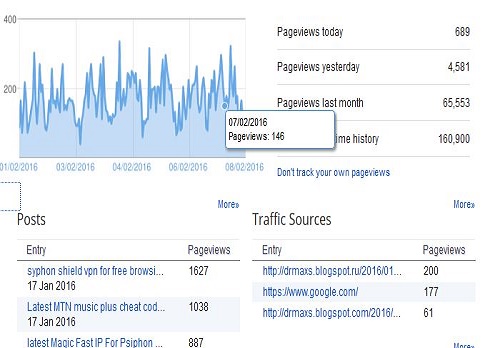
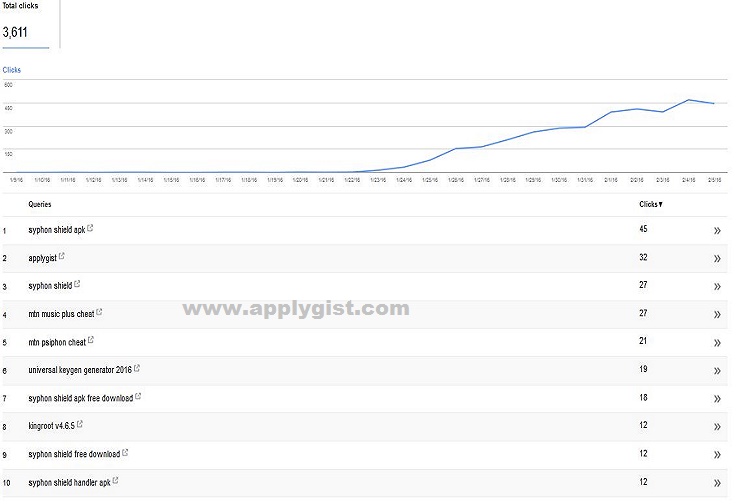
Are you a Blogger? And you are tired off Poo Traffic? This is the super Magic i found on how to get all your Pagest index on search engines in less than Two hours. I was frustrated when Google refused to index my pages in Good time. Google only Indexed 150 urls of over 195 so i went researching on Hpw to fix this and i discobvered that you will be doing yourself Damage if you still use the old style of Sitemap. Search Engines will not index your pages or they may not do so on time. 


DON'T
Solutions

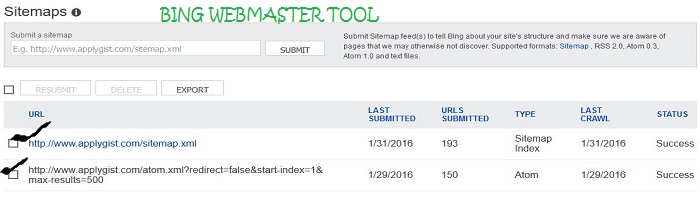
Use Just One Sitemap On your Google Search Console Formerly called Google Webmaster Tool 
Use this Default Site Map  http://www.applygist.com/sitemap.xml

Now the Above is Our Blog Site Map 
The Trick here is that Add your Url Like this http://myblogurl.com or http://www.myblog.blogspot or wordpress.com Followed by a Forward Slash like this /sitemap.xml
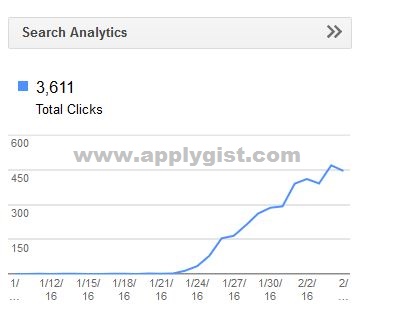
 The Above allows all your Pages Indexed without Limits See Screen Shot Bellow

NOTE: 
Should In Case Google and Other Search Engines Changes Startegy be sure to Get updates on this Page 


Written by Max of appygist.com  and published by Wizy of WizyTechs

I hope this article helps